A high refresh reading alone cannot explain uneven gameplay. Our high-FPS game stutter guide shows how to verify the counter and test frame-delivery symptoms.
Quick verdict: is 120Hz worth it?
If you scroll through feeds, read long pages, or move around the interface often, a well-implemented 120Hz display can make movement look smoother than a 60Hz display. It gives the screen more opportunities to show a new frame. That improvement is real, but the specification is a ceiling, not a promise about every app, game, or moment of use.
A 120Hz phone can still stutter if the app delivers frames unevenly, a game targets 60 frames per second (fps), the phone reduces performance under load, or a power setting limits the display. A well-tuned 60Hz phone may therefore feel steadier than a poorly tuned 120Hz phone in a particular task. That comparison is a buying principle, not a claim that any untested model wins.
Choose 120Hz when you value fluid scrolling and animation, the apps you use take advantage of it, and reviews show consistent behavior on the exact phone. A 60Hz model can be enough when the price difference would buy a more useful improvement elsewhere, you mostly read static content or watch conventional video, or you simply do not notice enough benefit in a hands-on comparison. Do not pay extra solely because the box says “120Hz.”
What actually changes at 120Hz?
Refresh rate is how often the display can update its image. At 60Hz, the screen has a refresh opportunity roughly every 16.7 milliseconds (1,000 ÷ 60). At 120Hz, those opportunities come roughly every 8.3 milliseconds (1,000 ÷ 120). Those figures describe the spacing of display refreshes. They are not measurements of touch response, app latency, or the time from tapping the screen to seeing a result.
During scrolling, text and images change position continuously. If the software supplies fresh frames in time, 120Hz can show smaller steps in that movement and reduce the visible jump between positions. Whether the difference feels large depends on the content, scrolling speed, the display and its settings, and the person using it. A static photo gains no extra detail simply because the panel refreshes more often.
Many modern phones vary their active refresh rate instead of staying at their advertised maximum. Android provides mechanisms for applications to tell the system their intended frame rate, and Samsung describes an Adaptive display mode that adjusts up to 120Hz. Exact choices vary by device and software; “up to 120Hz” should not be read as “120Hz in every app at all times.” Android frame-rate guidance · Samsung Motion Smoothness guidance
Refresh rate, FPS and frame pacing: three different questions
Think of a screen as having opportunities to present pictures and an app as producing those pictures. Refresh rate tells you how often the screen can update. FPS counts the new frames the app or game produces per second. Frame pacing describes whether those new frames arrive at reasonably even intervals.
| Situation | What the screen can show | Likely experience |
|---|---|---|
| 60Hz display, steady 60fps output | About one new frame per refresh | Consistent 60fps motion, within the limits of 60Hz |
| 120Hz display, steady 120fps output | About one new frame per refresh | More frequent changes in motion, if the device sustains them |
| 120Hz display, steady 60fps output | No additional unique game frames; a frame may be shown across two refreshes | Can remain smooth at 60fps, but does not become 120fps |
| 120Hz display, uneven frame delivery | Some images remain visible longer than others | Visible hitches are possible despite a high average FPS |
This table simplifies real display pipelines, but its central distinction is documented: Android gives the example of a game rendering at 60fps while a 120Hz display updates twice for each game frame. Its frame-pacing documentation also explains why short and long frame intervals can look like stutter. Android Frame Pacing library
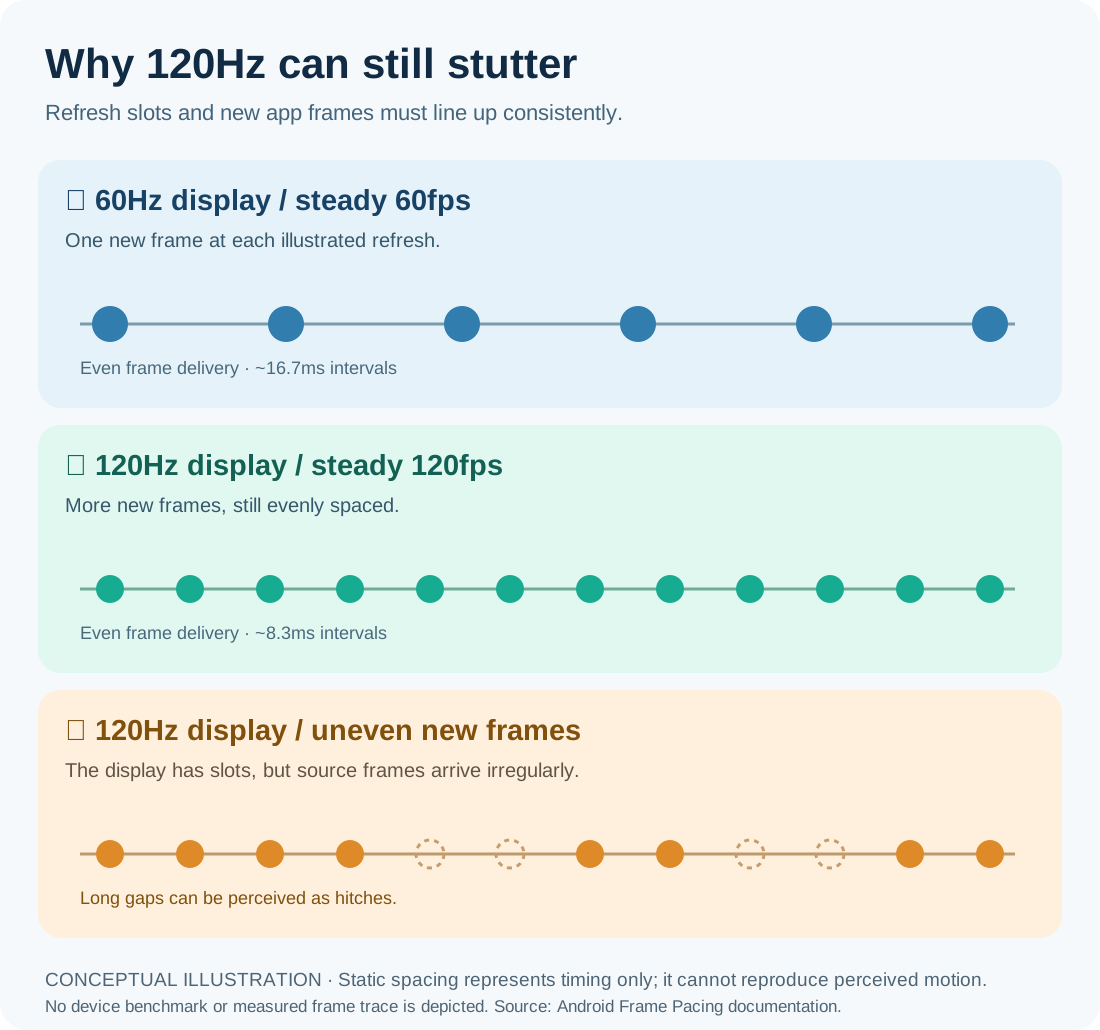
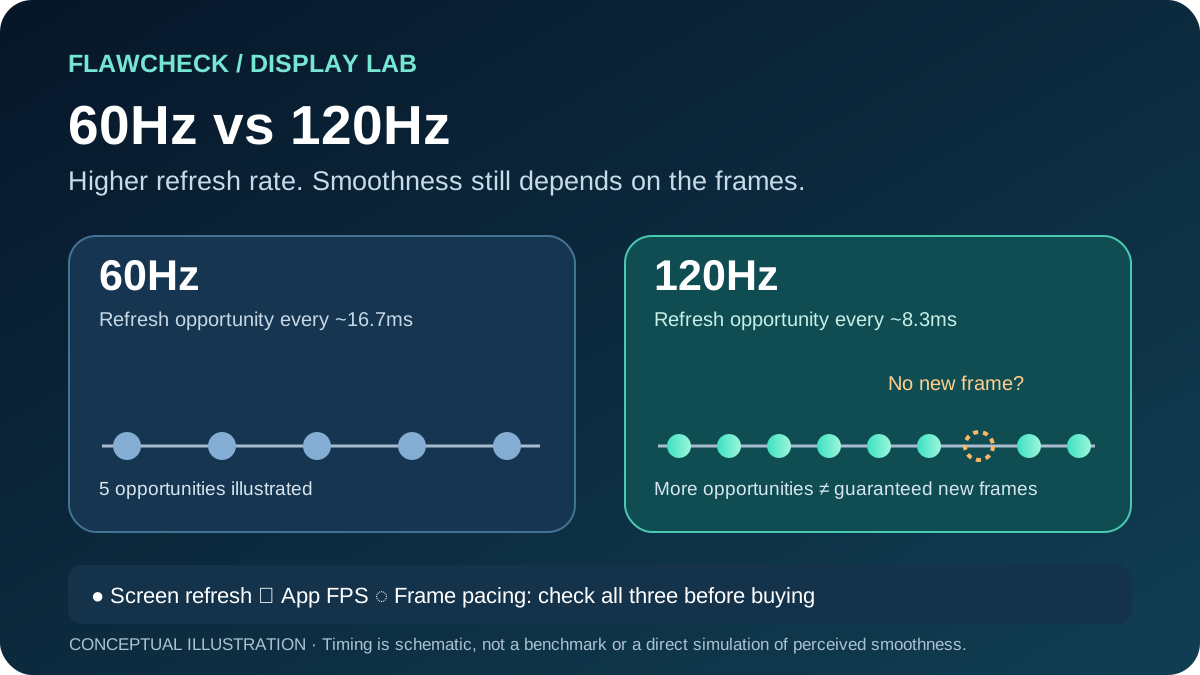
On a narrow screen, scroll the diagram sideways to read its timing labels.
Conceptual illustration, not measured data: circles represent new source frames; dashed circles represent refresh opportunities without a new source frame. A still image cannot demonstrate the actual sensation of 60Hz versus 120Hz.
A numerical example: a game that produces 60 frames every second on average has not necessarily delivered one new frame precisely every 16.7ms. A short interval followed by a long gap can make motion feel uneven. The average FPS hides that gap; a frame-time trace or a direct play test can reveal it. This is why a review that reports only peak FPS cannot establish how smooth a game feels.
Touch sampling rate is another separate specification: it concerns how often the touchscreen checks for input. A high touch sampling claim does not establish the app’s FPS, frame pacing, or complete touch-to-display latency. Judge responsiveness on the finished phone.
Why can a 120Hz phone still feel choppy?
The app or game supplies fewer new frames. Some content is produced at 24, 30, or 60fps, and games may offer their own frame-rate caps. A 120Hz panel cannot invent new, distinct frames from a 60fps game. Check the application’s actual settings and behavior rather than assuming that enabling 120Hz in the phone’s display menu enables 120fps everywhere. Android Frame Pacing library
Frame delivery is uneven. An animation that misses its presentation window can hold one picture longer than intended. Android’s game documentation explicitly describes short frames followed by long frames being perceived as stuttering. A phone may therefore feel less smooth than its average FPS suggests. Android Frame Pacing library
The phone cannot sustain its opening speed. A demanding game can put prolonged load on the processor and graphics system. Android advises developers to adjust game workloads as thermal headroom falls. This does not mean that a hot phone always throttles or that every hitch is thermal: the useful evidence is performance over time on the exact model, with the test conditions disclosed. For the deeper mechanism, see Phone Thermal Throttling Explained. Android Thermal API
A power or display setting changes the limit. On iPhones with ProMotion, Apple says Low Power Mode limits display refresh rate to 60Hz. The separate Limit Frame Rate accessibility setting also caps the display on supported models. Android warns that its system may override an app’s refresh-rate request based on factors such as battery level or device temperature. Samsung’s Adaptive and Standard options give different maximum refresh behavior on supported Galaxy phones. Menus and policies vary across models; check the exact device. Apple Low Power Mode · Apple Limit Frame Rate · Android refresh-rate guidance · Samsung Motion Smoothness guidance
The hitch has another cause. App loading, a network pause, background work, or an isolated software problem can feel like display lag without proving that the panel is at fault. First note where the problem occurs: throughout the interface, only inside one app, or only after a long gaming session. The answer determines what to check next.
Scrolling, video and gaming do not benefit equally
Scrolling and interface movement: These often provide the clearest reason to prefer 120Hz. When the phone and app keep up, moving text and interface elements can update more frequently. Try your usual browser and apps, since a showroom animation alone cannot represent every workflow.
Video: The source’s frame rate matters. A 24fps or 30fps video does not acquire 120 distinct captured frames on a 120Hz phone. The display may choose a suitable refresh behavior for playback, but a higher maximum refresh rate is not a promise of visibly smoother motion in every video. If video is your main use, also judge brightness, reflections, color, contrast, and battery life.
Gaming: A 120Hz display creates room to present higher frame rates, but the game must support the setting and the phone must deliver stable frames for the duration you play. A steady 60fps mode can be preferable to a nominal 120fps mode with frequent drops; the exact choice depends on the game and phone. Android recommends consistent high frame rates and describes battery modes that reduce peak frame rates. When comparing phones, seek a sustained FPS and frame-time test, not just a short peak reading. Android Game Mode guidance · Android Frame Pacing library
The battery trade-off: how much does 120Hz cost?
Higher refresh operation can require more power than lower refresh operation under otherwise comparable conditions. Android describes avoiding unnecessary display updates to save energy, and Samsung labels its 60Hz Standard mode as a battery-saving option. Adaptive refresh can reduce needless high-rate operation when the content does not need it. None of those statements yields a universal “120Hz costs X% battery” figure. Android Frame Pacing library · Samsung Motion Smoothness guidance
A meaningful battery comparison must use the same phone, comparable brightness, network conditions, applications, workload, software version, and battery state, changing the refresh setting as the tested variable. Even then, the result describes those conditions, not every owner’s day. Brightness, radios, gaming load, and how often adaptive refresh steps down can shift the observed difference. If endurance is a deciding factor, look for a review that discloses its test method or try both settings in your own routine.
Does LTPO solve the problem?
LTPO is a display backplane technology that can support efficient adaptive refresh behavior. It can help a phone lower its refresh rate when higher rates are unnecessary, but the label does not certify that the phone always reaches a particular low rate, uses less battery by a fixed amount, or maintains stable game FPS. Software policy, the actual panel, and the app still matter. Our Phone Display Technologies Explained guide covers LTPO and other panel terminology in detail.
In particular, LTPO cannot manufacture frames that a game did not render. If the graphics workload causes uneven delivery, buying a more advanced display backplane alone does not remove the workload.
When is 60Hz enough, and when is 120Hz worth it?
Compare the actual trade-offs
| Use case | 60Hz experience | What 120Hz can change | What the label cannot promise |
|---|---|---|---|
| 📜 Scrolling and interface | Up to 60 display updates per second | More frequent visible steps when new frames arrive | Smoothness in every app |
| ▶️ Video | Can display conventional source frame rates | May offer different cadence options depending on content and implementation | Extra unique frames in a 24/30/60fps source |
| 🎮 Gaming | Can present up to 60 distinct frames per second | Room for supported higher frame rates | Sustained 120fps or even frame pacing |
| 🔋 Battery | Lower refresh operation can save energy | Adaptive 120Hz can step down when appropriate | A universal battery penalty or saving |
| 💰 Price | May leave budget for other strengths | Potentially smoother supported motion | Better total display quality or overall value |
FlawCheck takeaway: The best refresh-rate choice is the one that improves your frequent tasks without sacrificing more valuable parts of the phone.
| Your priority | What 120Hz may add | Check before paying more | Buying lean |
|---|---|---|---|
| 📜 Frequent scrolling, reading feeds and interface navigation | Smoother motion when apps keep pace | Your common apps on the exact model; power mode off during comparison | Favor a well-implemented 120Hz option if the difference matters to you |
| 📖 Mostly static reading, messaging and photos | Less benefit during still content | Other display qualities, battery, price and repair costs | A good 60Hz phone may be sufficient |
| ▶️ Mostly watching 24/30/60fps video | Limited benefit from the refresh ceiling alone | Source frame rate, brightness, reflections and color | Prioritize the whole display over the Hz label |
| 🎮 Competitive or fast-moving games | Potential to show higher supported FPS | Game support, sustained FPS, frame times, heat and battery | Favor the phone that sustains the experience you want |
| 💰 Tight budget | Possible visual upgrade with an opportunity cost | What you give up in storage, battery, camera, software support or panel quality | Compare the complete phones at the same price |
| 🔋 Battery life above all else | Adaptive behavior may help manage the trade-off | Same-model battery tests at comparable settings | Choose based on measured endurance in your use case |
These are decision rules, not rankings of untested products. Refresh rate is one part of a display purchase: outdoor readability, flicker behavior, color, durability, and replacement cost can matter more to a particular buyer. If low-brightness behavior matters to you, our PWM dimming guide explains why refresh Hz and a claimed flicker frequency answer different questions. Our long-term phone buying guide helps weigh those costs alongside performance.
What should you check before buying a 120Hz phone?
Five-minute store check: ① Match display and power settings → ② Scroll the same long page → ③ Open your everyday apps → ④ Check game FPS separately from displayed Hz → ⑤ Read a sustained-performance test before committing.
- Compare the same task. Scroll the same long page and use the same app on the phones you are considering. Check that the desired refresh setting is active and that battery-saving settings are comparable.
- Test the applications you actually use. A smooth launcher does not prove every browser, social app, or game behaves the same way.
- Separate displayed Hz from rendered FPS. On supported Android devices, the developer-options refresh-rate overlay shows the display’s current refresh rate; it does not by itself prove that an app is producing a unique new frame on every refresh. Use a game FPS or frame-time measurement when the game decision matters. Android performance measurement guidance
- Look beyond the first minute of gaming. Read tests with sustained performance and frame-time consistency on the exact model. Processor names and peak benchmarks alone cannot establish the finished phone’s experience; see Smartphone Processor Specs Explained and how to interpret phone benchmark scores.
- Check battery and display compromises. Seek same-device testing of refresh settings. Evaluate brightness and other panel qualities rather than accepting the Hz figure as a display-quality score.
A short check if your existing 120Hz phone feels slow
Note whether the problem appears only in one app or game, only after extended use, or everywhere. Confirm the display and power settings; check the app’s own frame-rate option if it has one. Compare the same task after the phone has cooled and without charging, keeping other conditions similar. If the issue appears only after a sustained workload, the thermal throttling guide explains what evidence to collect. If it appears in every app regardless of load, a 120Hz specification alone cannot diagnose the cause.
Verdict
120Hz is worth prioritizing for people who notice and value smoother scrolling and supported high-frame-rate content—provided the phone delivers consistent frames in their actual apps. It raises the screen’s motion capability, but does not certify app optimization, sustained gaming performance, low latency, or all-day battery life. If your budget forces a choice, compare complete phones rather than treating 120Hz as a guarantee of quality.