More megapixels can be useful when you want fine detail, room to crop or a larger output. But a 200MP specification does not establish that a phone takes better photographs than a 50MP one. The extra samples must become useful information in the image you actually keep.
If you already own a high-resolution phone, compare its normal and high-resolution modes before changing your default. If you are buying, look for repeated photographs of your usual subjects, lighting and distances. A resolution number cannot answer those questions by itself.
Evidence disclosure: This is a research-based guide using manufacturer documentation, optical engineering material and original developer research. FlawCheck has not conducted a matched camera test. Numerical examples explain sampling grids and documented modes; they are not measured detail gains or camera scores.
Quick answer: are more megapixels better?
Decision in 30 seconds: Try high resolution for a bright, static scene or a substantial crop. Keep it when repeated equal-size comparisons show useful detail and acceptable capture speed. Before buying, request samples of your recurring camera problem.
What does a megapixel actually measure?
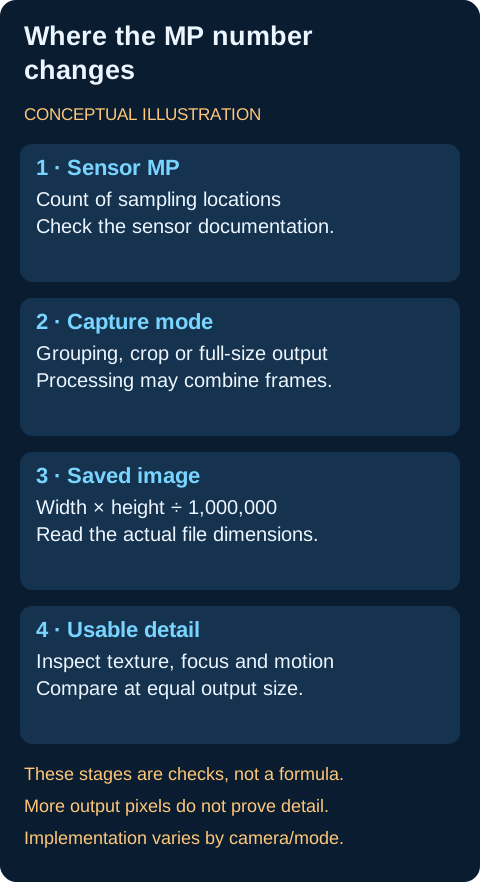
One megapixel means one million pixels. For an image file, multiply its width by its height and divide by one million. A 4000 × 3000 image contains 12 million pixels: 12MP.
Keep three descriptions separate:
- Sensor resolution: the documented count of light-sensitive sampling locations, or photosites, on the sensor.
- Saved resolution: the pixel dimensions of the finished photograph.
- Resolved detail: the scene information you can distinguish in that photograph.
They are related, but a larger file does not automatically contain more useful texture. Edmund Optics’ explanation of resolution distinguishes pixel sampling from the imaging system’s ability to reproduce detail. Lighting and optics also matter.
Four times the pixels does not mean four times the detail
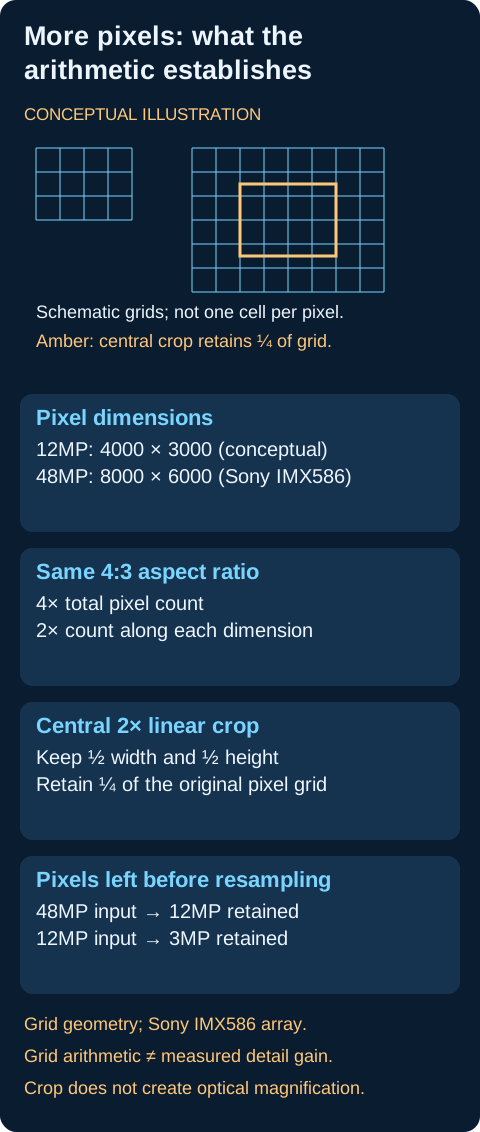
Sony documents an 8000 × 6000 effective array for its historical IMX586 sensor. That is 48MP. Compared with our conceptual 4000 × 3000 grid, it has four times the total samples, but twice the count along each axis. Source: Sony IMX586 announcement.
The calculation describes grid dimensions at the same aspect ratio. It does not establish twice the measured scene detail. Think of it as more positions at which information can be represented, then ask what information the capture system actually supplies.
For the wider relationship between the camera’s components, read our phone camera specifications guide.
Why a 48MP or 200MP camera may save a lower-resolution photo
A lower-resolution file is not, by itself, evidence that the camera is faulty. The selected mode may combine neighboring sensor signals, use a crop, or produce an output chosen by the camera’s processing pipeline.
Pixel binning combines neighboring samples
Some high-resolution sensors use grouped capture to produce a smaller output. Sony’s IMX586 documentation describes a Quad Bayer arrangement with neighboring 2 × 2 photosites sharing the same filter color. It describes combining their signals for 12MP capture and array conversion for higher-resolution output.
Samsung’s ISOCELL HP2 announcement documents a 200MP sensor with four-pixel and sixteen-pixel grouping, producing nominal 50MP and 12.5MP modes. Its native pitch is 0.6µm; the quoted grouped figures are 1.2µm and 2.4µm. Source: Samsung HP2 announcement.
The physical photosites do not grow. A grouped figure describes an arrangement of existing samples, not complete equivalence to another sensor designed with larger native photosites. Also distinguish a nominal 12.5MP calculation from an app’s “12MP” label: inspect the saved file dimensions when the exact output matters.
Remosaic and multi-frame processing are different steps
Remosaic, or array conversion, addresses how the color-filter arrangement is converted for a particular output. Samsung’s technology explanation describes it separately from grouped capture. Selecting high resolution does not simply recover discarded information from an already saved low-resolution image. Nor does a full-size file imply independently measured red, green and blue information at every sensor location.
The camera may also combine several frames. Google’s 2019 handheld multi-frame super-resolution research demonstrates using aligned raw frames to improve resolution and signal-to-noise. That historical algorithm illustrates why processing matters; it does not describe every current camera mode.
Three documented phone examples
The Galaxy S23 Ultra uses HP2, according to Samsung’s device–sensor page. Its support documentation identifies 50MP and 200MP shooting options. Sensor capabilities and app options therefore need separate checks.
For iPhone 14 Pro, we use Apple’s historical iOS 17 support example for 12MP/48MP ProRAW and HEIF Max. Those restrictions must not be projected onto newer generations. The iPhone 14 Pro specifications identify its 48MP main camera and separate camera modules.
For the base iPhone 16, Apple specifies a 48MP main camera, supported 24MP/48MP photographs, a main-camera-enabled 12MP 2x view, and HEIF/JPEG formats. This specification does not establish how the 24MP output is constructed.
When more megapixels can help
Static detail in favorable light
High-resolution capture is worth trying for a stationary scene with fine features: a building facade, landscape, textile or object you want to inspect later. Check whether lettering, foliage and edges remain distinct in the result. An enlarged patch that looks crunchy or smeared is not the same benefit as additional usable texture.
This is a reason to compare modes, rather than an assurance that the highest-resolution mode wins. Test several scenes, including the kind of light in which you usually shoot.
More room to crop
An ideal central crop that halves the width and height retains one-quarter of the original grid. Starting with 48MP leaves 12MP; starting with a saved 12MP image leaves 3MP. These are arithmetic examples before any enlargement or further processing.
The starting point matters. Cropping a saved grouped image is not the same operation as selecting a region from the sensor’s higher-resolution sampling. A phone’s zoom pipeline can involve additional processing, so the arithmetic alone does not establish its quality.
For the mechanism behind the label, read optical-quality zoom versus optical zoom.
Larger prints or exports
Output requirements can make extra pixels useful. At a chosen 300 pixels per inch, our conceptual 4000 × 3000 image maps to approximately 13.33 × 10 inches, or 33.87 × 25.40cm. That is a print-size calculation, not a universal quality threshold.
For your own output, consider crop, viewing distance and whether important texture remains visible. Avoid choosing a capture mode solely for a print size you will never use.
Why more megapixels may not improve your shot
Watch out: A grouped pitch figure does not mean the physical photosites grow. Fewer MP do not guarantee less noise, and equal output MP do not establish equal quality.
Lens and focus can limit the information
A larger output grid cannot establish that the lens delivered clear detail or that focus landed where you wanted it. Evaluate the subject and the corners, rather than finding one sharp patch and treating it as a complete camera verdict. The optical resolution explanation provides the technical background.
Movement is a separate problem
Google’s historical Night Sight explanation shows why exposure duration must account for scene motion. Its example uses motion metering to reduce blur on a moving dog. This is evidence about an exposure mechanism, not a comparison of high-resolution modes.
For children or pets, inspect repeated moving-subject captures. A detailed photograph of a stationary building answers a different question. Also distinguish exposure duration from capture timing, processing delay and the interval before the next shot.
Less noise is not guaranteed by fewer megapixels
Sensor design, exposure and multi-frame processing complicate a simple MP comparison. The primary sensor and developer documentation above supports treating these as separate variables. It does not support a universal rule that every lower-MP camera produces cleaner photos.
Our practical recommendation is to compare noise and retained texture at the same output size first. Only then inspect pixel-level views. For the physical-area question, see phone camera sensor size explained.
Sharpening can resemble detail
When checking fine features, ask whether they remain distinguishable, rather than judging sharpness from strong edges alone. Inspect lettering, fabric and foliage for recognizable structure as well as halos or smeared areas. Our guide to overprocessed iPhone photos covers the processing controls and workflow more deeply.
Read the claim before drawing the conclusion
| Specification or claim | What it establishes | What it leaves unanswered |
|---|---|---|
| Sensor MP | Documented sampling count | Saved resolution and useful detail |
| Larger file dimensions | More output pixels | Better texture, color or motion capture |
| Grouped capture | A documented lower-resolution arrangement | Physical pixel growth or equivalence to another sensor |
| Full-resolution remosaic | A documented output-construction method | Independent RGB measurement at every photosite |
| Same output MP on two phones | Similar nominal pixel counts | Equal optics, noise, focus or processing |
| More pixels remaining after crop | Additional grid positions | Optical magnification or a guaranteed zoom result |
| RAW or ProRAW option | A format/workflow choice | Maximum resolution or complete removal of processing |
Sources: Sony IMX586 announcement; Samsung HP2 announcement; Samsung remosaic technology; Apple ProRAW support; Edmund Optics Resolution
This is an interpretation table based on the sensor, optical and format sources above. It reports no device-test results.
Default mode versus high-resolution mode
Treat the default as a starting point, then change it for a demonstrated benefit. A convenient mode that repeatedly captures your important moments can be preferable to one whose extra resolution you rarely use.
Check speed and feature availability on your phone
Samsung’s February 2023 S23 Ultra support page says higher-resolution images can increase processing time and intervals between shots. It gives no universal timing figure or firmware-specific benchmark.
Try a short sequence before relying on the mode for an event. Check whether you can take the next photograph when needed. Separately verify which cameras and features remain available; do not assume all high-resolution modes disable HDR or other processing.
Resolution and RAW are separate decisions
Apple’s ProRAW support, published in April 2024, distinguishes HEIF Max from RAW options in its historical iOS 17 example. It also explains that ProRAW incorporates image processing.
Choose resolution for your output needs and format for your editing workflow. RAW does not inherently mean maximum resolution, and a high-resolution photograph can use HEIF or JPEG.
For storage context, that Apple page quotes approximately 25MB for 12MP ProRAW and 75MB for 48MP ProRAW. These manufacturer estimates are not FlawCheck measurements, normal HEIF/JPEG sizes or a universal size multiplier. Check your actual files.
Choose a mode for your actual output
Use the normal mode as a starting point and try high resolution when a crop, static detail or larger output gives it a purpose. Our 12MP versus 48MP photo-mode guide provides the scene table, 24MP option, format trade-offs and repeatable comparison checklist.
How to interpret a mode comparison
Compare the same physical camera and format at the same output size, repeat the captures and inspect the actual saved dimensions. A larger grid does not establish a useful detail gain. The step-by-step comparison method covers scene selection, motion, corresponding crops and capture workflow.
What to check before buying a higher-megapixel phone
Write down the problem you want the upgrade to solve: blurred indoor faces, weak travel crops, lost landscape texture or an inconvenient camera workflow. Then request evidence of that specific task.
Look for repeated original images with the camera and mode identified. Verify the main camera separately from ultrawide, telephoto and selfie views. A main-camera specification does not establish how the other cameras perform.
Check both the mode you will normally use and any special mode whose benefits persuaded you to buy. Include the work required to obtain the result: deliberate capture, waiting, editing and handling larger files.
Compare different phones as complete systems. If one has more MP but less reliable results in your usual situation, the specification has not answered your buying question. Conversely, a repeatable improvement in a crop you regularly make can be a useful benefit even when everyday output looks similar.
Who high resolution fits best
It is worth comparing for photographers who regularly crop static scenes, inspect fine detail or create larger exports. For repeated indoor movement or fast sequences, prioritize the workflow that reliably captures your subject; verify any high-resolution advantage separately.
Bottom line
More megapixels are worth considering when they produce useful detail or output flexibility in your photographs. Verify that benefit at your intended viewing size and weigh it against capture responsiveness, feature availability and workflow.
For buying decisions, prioritize repeated improvements in your recurring camera problem. For settings, keep high resolution enabled when your own comparisons justify it. The number describes a capability; the photographs show how much of it you can use.