Your phone says it can add 4GB, 8GB or even more “RAM” with one setting. That sounds like a free performance upgrade. It is not.
Virtual RAM can sometimes keep an older or memory-limited phone from reloading background apps. It does not turn storage into physical RAM, raise gaming frame rates or make the processor faster. On a phone that already has enough memory, increasing it may produce no noticeable improvement—and an unsuitable configuration can add compression work or slower memory recovery under pressure.
The useful question is: Does this setting improve the way I use this particular phone? A one-tap cleaner makes a different promise; our RAM cleaner app guide explains why increasing the free-RAM number is not a speed test.
The quick answer: does Virtual RAM make a phone faster?
Usually, not in the way most people mean by faster.
Virtual RAM may help a phone retain more background state when physical RAM is nearly full. If it works well, returning to an older app may avoid a complete reload. That can feel quicker than reopening the app from scratch. To separate memory behavior from CPU, GPU and thermal limits, use our smartphone processor specification guide before treating a chipset name or clock speed as the explanation.
It normally does not make the foreground app calculate, render or download faster. It does not add CPU or GPU performance. It is not equivalent to buying the same phone with more physical RAM.
Our practical starting advice is:
- 4GB phones: leave the default enabled unless it causes a repeatable problem.
- 6GB phones: use the default or a modest setting; test your real multitasking sequence.
- 8GB phones: keep the default, but do not increase it expecting extra speed.
- 12GB phones: the benefit is likely to be small for ordinary use; leave the default alone or test off if troubleshooting.
There is no honest universal answer of “always enable it” or “always disable it.” Android versions, manufacturer tuning, storage performance, background-app policies and workloads differ too much.
Virtual RAM, zRAM and physical RAM are not the same thing
Phone makers often place several different mechanisms under labels such as RAM Plus, Memory Extension, Extended RAM or Dynamic RAM Expansion. The displayed number can make them look interchangeable, but they are not.
| Memory type | Where the data is kept | Main trade-off | What it is good for |
|---|---|---|---|
| Physical RAM | Dedicated DRAM chips | Fast but fixed at manufacture | Active apps, games and system processes |
| zRAM | Compressed pages inside physical RAM | Saves space but requires CPU work | Delaying memory pressure when data compresses well |
| Storage-backed swap | Flash storage | More capacity but much higher latency than DRAM | Parking less-active pages instead of immediately discarding them |
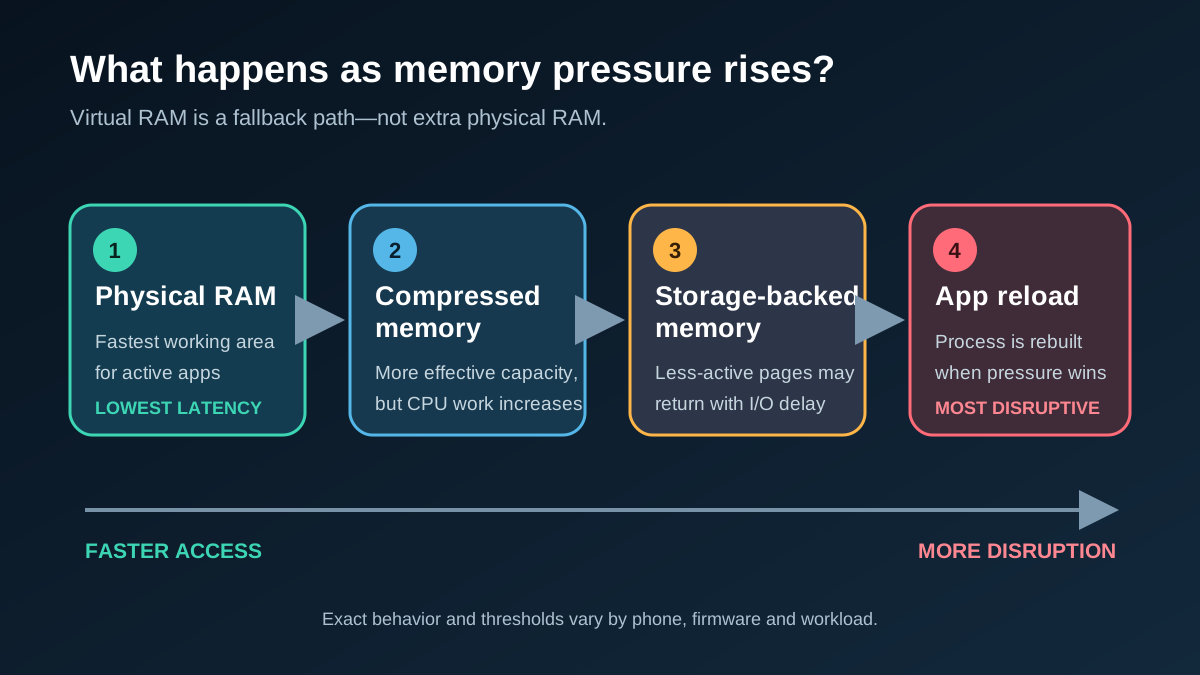
Memory-pressure path, simplified. A phone may use only some of these stages, and the exact order and thresholds depend on its firmware.
Physical RAM provides the low latency and high bandwidth expected by active apps. Software cannot convert phone storage into memory with the same characteristics.
That fixed hardware limit also matters when buying for several years. Our guide to whether soldered RAM is a dealbreaker explains why software workarounds cannot create a later physical upgrade path.
zRAM is also easy to misunderstand. The Linux kernel documentation describes it as a compressed block device created in RAM. Android can use that device for swap: pages are compressed so they occupy less physical memory. The gain depends on how well the data compresses, and compression/decompression consumes processor time.
Storage-backed swap can move less-active pages out of physical RAM, but restoring them involves slower flash I/O. It may still beat rebuilding an app from nothing. Our eMMC vs UFS storage guide explains where internal storage speed can matter, while distinguishing a slow app launch from an app that Android closed because of RAM pressure.
What does Samsung RAM Plus actually do?
Samsung describes RAM Plus as a feature that uses internal storage as virtual memory. Samsung says the added memory can keep more apps open in the background and help apps launch faster. Users can select an amount and restart the phone.
That is the manufacturer’s description—not proof that every Galaxy device reserves and uses storage in precisely the same way.
A technical examination reported by SamMobile found that zRAM remained active on tested Galaxy devices even after the visible RAM Plus option was turned off. The reported free-storage behavior also did not match a simple interpretation in which the selected number was permanently carved out as a swap file.
The user-facing label simplifies a lower-level system that can vary by model and firmware. A RAM Plus selection may change compression, swap or memory-management parameters rather than behave like a physical RAM module.
The same caution applies to Xiaomi, Oppo, OnePlus, Vivo, iQOO, Realme and other manufacturers. Similar names and “+8GB” badges do not prove identical implementations. Unless a claim is verified on a named device and firmware, we should not use one brand’s behavior to explain every Android phone.
If you are choosing within Samsung’s range, use our Samsung Galaxy buying guide to compare physical memory and storage before relying on RAM Plus. The Galaxy S26 FE review is a useful example: its 8GB physical-RAM configuration matters more to the buying decision than the size of a software memory setting.
When Virtual RAM can help
Virtual RAM is most plausible as a multitasking safety net, not a general accelerator.
A low-RAM phone repeatedly reloads apps
On a 4GB phone, opening the camera, browser, navigation, messaging and a social app can create real memory pressure. Android may terminate a less-important cached process so the foreground task remains usable. When you return, the app starts again.
Android’s lmkd documentation explains that the system monitors memory pressure and can kill less-essential processes to maintain acceptable performance. If compressed memory or swap lets the system preserve useful pages for longer, the phone may avoid some reloads.
You switch among several moderate apps
Virtual memory has a better chance of helping when the background apps are inactive but worth preserving. Messaging, notes, a browser tab and a shopping app may benefit more than several heavy games competing for memory and graphics resources.
A reload is more expensive than a resume
An app that reconstructs a complex document, reloads a web form or downloads its state again can be frustrating to restart. Preserving that state—even in slower memory—may be worthwhile.
These are plausible benefits, not guarantees. A manufacturer may still terminate an app for battery, privacy or stability reasons.
When it makes no meaningful difference
If the phone never approaches memory pressure, extra swap capacity has little useful work to do. A typical user moving between a few everyday apps on an 8GB or 12GB phone may see no measurable change.
It also will not fix bottlenecks unrelated to memory:
- Low game frame rates caused by the GPU.
- Slow exports limited by CPU performance.
- Stutter caused by heat and thermal throttling.
- Slow downloads caused by the network.
- Long app launches caused by weak storage or app design.
- Background kills caused by aggressive battery management.
Synthetic scores can be misleading here. A small change in an overall benchmark does not prove better app retention, and an app-retention test does not prove higher gaming performance. Each claim needs a workload that actually measures it.
We did not find a sufficiently documented independent test that supports a universal percentage improvement across Android phones while controlling the same device, firmware, temperature, battery mode and workload. Broad statements such as “RAM expansion makes every phone 20% faster” should therefore be treated as unsupported.
Can Virtual RAM make a phone slower?
It can, under some conditions, but “RAM Plus always slows phones down” is also too absolute.
Compressing and decompressing pages requires CPU work. Reading swapped pages from storage has greater latency than accessing physical RAM. If the system swaps too aggressively, the phone may spend time moving or recovering memory instead of completing the foreground task. In a severe case, repeated reclaim and swap activity can contribute to visible pauses.
However, the alternative may be killing the app and performing a full cold launch. That can be slower than recovering preserved state. The outcome depends on which cost is smaller for the specific workload.
Owners of the same product family can report opposite results because firmware, RAM variants, apps and test sequences differ. Such reports cannot establish a universal rule.
If you suspect the feature is causing stutter, do not judge it from a few minutes of random use. Change one setting, restart, let the phone settle and repeat the same app sequence several times.
Recheck the result after a major firmware change because memory tuning can change with the operating system. Our guide to installing a major Android update immediately explains why a staged rollout and early owner reports may be safer than assuming day-one behavior is final.
Does it drain the battery or wear out storage?
Both concerns are technically plausible, but neither should be exaggerated without device-specific measurements.
Compression consumes processor cycles. Storage-backed swapping requires I/O. Either activity uses energy. But avoiding repeated app launches can also avoid processing, networking and storage work. The net battery effect depends on how often memory pressure occurs and how the manufacturer tuned the system. If you see unusual idle drain, distinguish cached apps from active background work before attributing it to RAM Plus.
NAND flash has finite write endurance, so storage-backed swap adds some writes. Yet controllers manage wear, and write volume varies by implementation and workload. We found no strong device-specific study translating a normal vendor setting into a reliable lifespan reduction.
For now, the defensible conclusions are:
- “RAM Plus always drains battery” remains a candidate claim.
- “Virtual RAM materially shortens phone lifespan” remains a candidate claim.
- Neither claim should be used to frighten users into changing a stable default.
If a particular firmware is shown through controlled testing to cause excessive swapping, heat or energy use, that evidence should be attached to that device and version—not generalized to every phone.
Should you choose 2GB, 4GB, 8GB or turn it off?
The largest setting is not automatically the best. It is an upper allowance or configuration choice, not a promise that the phone gains that much fast memory.
| Setting | Sensible use | Main downside |
|---|---|---|
| Off | Troubleshooting a well-equipped phone, or testing a repeatable stutter | The underlying system may still use zRAM; more app reloads are possible |
| 2GB | Conservative starting point on a 6GB–8GB phone | May not change heavy multitasking |
| 4GB | Reasonable default test on a 4GB–6GB phone | Benefit remains workload-dependent |
| 8GB | Only if the manufacturer defaults to it or repeatable testing shows better retention | A larger number does not mean faster memory and may add no benefit |
Do not use the popular rule “set virtual RAM to half your physical RAM” as if it were a technical standard. It is a rule of thumb without broad validation across devices.
Start with the manufacturer’s default. Move to a smaller setting or off only when investigating a reproducible issue. Move higher only when a repeatable multitasking test shows fewer costly reloads without worse responsiveness.
Recommendations for 4GB, 6GB, 8GB and 12GB phones
| Physical RAM | Typical use | Is Virtual RAM worth enabling? |
|---|---|---|
| 4GB | Light apps, limited multitasking | It may help, but it cannot remove the hardware limit |
| 6GB | Ordinary daily use | Try a low setting, then reassess with the same app sequence |
| 8GB | Most users and mixed apps | The benefit may be small; do not increase it for “speed” |
| 12GB+ | Ordinary daily use | A large virtual allocation is usually unnecessary |
These are starting points, not official requirements.
For a broader purchase decision, Best Phones for Long-Term Ownership weighs memory headroom alongside battery service, repair access, storage and software support.
For a symptom-first check before changing RAM Plus, our Android app reload troubleshooting guide separates full restarts from delayed notifications and tests one app against several.
Decision table: should RAM expansion be on or off?
| Symptom | Can RAM Plus help? | Other causes to check |
|---|---|---|
| Apps reload when you return | Possibly | Background policy, battery saver and app behavior |
| Games stutter or lose FPS | Usually not | GPU load, heat, chipset and graphics settings |
| The phone is short on storage | It may be disadvantageous | Large videos, cache, downloads and app data |
| Switching apps feels slow | It depends | Slow storage, weak physical RAM or app startup behavior |
| One app will not stay open | Possibly | Per-app battery restrictions and crashes |
| Battery drain appears after a change | Unproven without testing | Network, display, wake locks and background syncing |
A simple A/B test
- Record the phone model, firmware, battery mode and current setting.
- Restart and wait several minutes.
- Open the same five to eight apps in the same order.
- Return through them in reverse order and record full reloads and slow resumes.
- Change only RAM expansion, restart and repeat at least three times.
Keep temperature, network conditions and app versions as consistent as practical. If the result is indistinguishable, use the default rather than optimizing a number you cannot feel.
Verdict
Virtual RAM is a fallback mechanism presented as an upgrade. Its real value is narrower than the marketing: it may preserve background state when physical memory is tight. It does not add physical RAM, and it usually does not make the foreground app or game faster. For a purchase decision between actual memory configurations, use our 6GB, 8GB and 12GB Android RAM buying guide to compare workloads, variant prices and ownership plans.
Low-RAM phones have the strongest reason to keep a modest default enabled. Phones with 8GB or 12GB should not be given a larger setting simply because the menu offers one. Test a real problem, change one variable and keep the configuration that produces fewer disruptive reloads without adding stutter.
That answer is less exciting than “add 8GB for free,” but it matches what the technology can actually do.