An eight-core, 3nm smartphone processor running above 3GHz can still deliver worse sustained performance than a lower-clocked rival. The specification describes what the chip contains—not how well the finished phone uses it.
A phone chip is also much more than a CPU. Its graphics processor, AI accelerator, image processor, modem and memory system can affect gaming, photography, connectivity and battery drain. Yet none of those components operates in isolation. Cooling, power limits, RAM, storage, software and the phone’s physical design can change the result.
This guide explains what each smartphone processor specification measures, what it leaves out and what evidence you should check before buying a phone. For a task-by-task view of chip, RAM, storage, cooling and software together, start with what makes a phone fast.
The short answer: processor specs rarely predict the whole experience
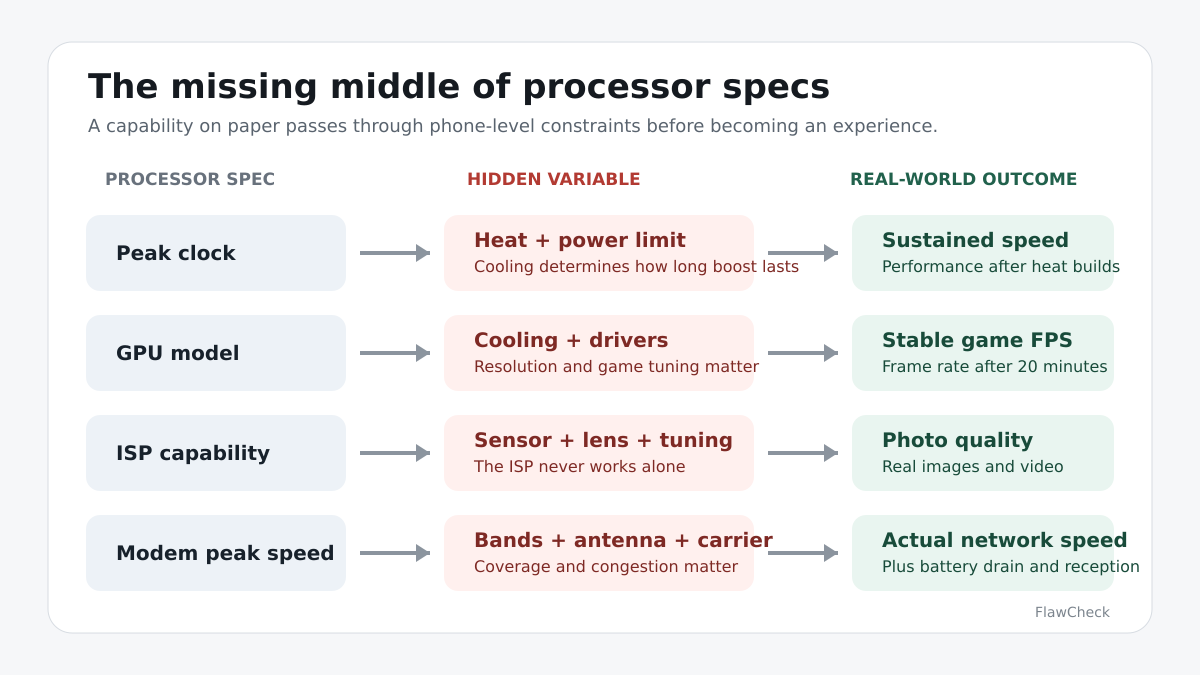
Processor specifications describe capabilities, not a guaranteed user experience. Core count and clock speed tell you something about the CPU. The GPU model indicates the graphics hardware available. A process-node label identifies a manufacturing generation. None of them proves that a phone will remain fast, cool or efficient under real use.
That is because the finished device controls how the chip operates. A manufacturer can favor short bursts of speed, lower surface temperatures, longer battery life or steadier gaming performance. RAM bandwidth, storage speed, software scheduling, drivers and ambient temperature can also affect test results.
Start with the exact processor model, but make the buying decision using device-level evidence. If the choice is between chip brands, our Snapdragon vs MediaTek buying guide applies that distinction to actual phones, games, features and price.
| Specification | What it can indicate | What it cannot prove |
|---|---|---|
| CPU core count | Number and arrangement of CPU cores | How fast each core is |
| Clock speed | Maximum operating frequency | Work completed per clock cycle |
| Process node | Manufacturing generation | Finished-phone efficiency |
| GPU model | Theoretical graphics capability | Sustained gaming performance |
| AI TOPS | Certain AI-compute throughput | Real AI feature quality |
| Benchmark score | Performance in one test | Everyday speed and stability |
FlawCheck takeaway: A specification can reveal a capability ceiling. It cannot tell you how often—or how long—the finished phone can reach it.
What is a smartphone processor—and is it the same as a CPU?
The terms processor, chipset, CPU and system-on-chip are often used loosely in phone listings, but they do not mean exactly the same thing.
The CPU is the general-purpose processing component that runs operating-system instructions, application logic and many background tasks. The system-on-chip, or SoC, is the larger package containing that CPU and several other specialized components. In consumer specifications, “processor” and “chipset” usually refer to this complete SoC rather than only the CPU.
That distinction matters. Comparing only CPU cores ignores the hardware responsible for graphics, camera processing, AI and cellular connectivity.
| Component | Main role | Buyer-facing effect |
|---|---|---|
| CPU | General-purpose processing | App responsiveness and system tasks |
| GPU | Graphics and parallel workloads | Gaming, rendering and some compute tasks |
| NPU or AI engine | Supported machine-learning workloads | On-device AI capability and efficiency |
| ISP | Camera-data processing | Photo and video capabilities |
| Modem | Cellular communication | Network support, speed and efficiency |
| Memory controller | Moves data between the SoC and RAM | Bandwidth and responsiveness |
| Video engine | Hardware encoding and decoding | Recording and media playback |
| DSP | Specialized signal processing | Audio, sensors and low-power tasks |
An SoC specification may say that the chip supports a camera resolution, video format, display refresh rate or network standard. The phone manufacturer still decides whether to include the necessary sensor, antenna, memory, cooling and software. Platform support is not proof that every phone using the chip implements the feature.
CPU core count: why eight cores do not mean eight fast cores
A CPU core can execute a stream of instructions. Adding cores can improve throughput when software divides its work across them, but performance does not rise automatically in proportion to core count. Some tasks depend heavily on one fast core, while others can use several cores at once. Many everyday workloads alternate between short bursts and idle periods rather than loading every core continuously.
Modern phone CPUs also combine different kinds of cores. An “octa-core” processor might have one high-performance prime core, several performance cores and several efficiency cores. Another eight-core design can use a different arrangement, architecture, cache system and power target. The two chips share the same core count but not the same performance.
Core count also leaves out:
- The architecture and capability of each core.
- How much cache is available.
- Memory latency and bandwidth.
- How the operating system schedules tasks.
- Power and temperature limits.
- Whether the application can use multiple cores effectively.
Do not assume an eight-core CPU beats a six-core CPU. Check the exact architecture and phone-level tests, including single-core, multi-core and sustained results.
Clock speed: why 3.4GHz does not automatically beat 3.0GHz
Gigahertz measures clock cycles per second. A 3.4GHz core runs 3.4 billion cycles each second, but a cycle is not a fixed amount of useful work. Different CPU architectures can complete different amounts of work per cycle. Cache, memory access, branch prediction and software can also change how efficiently those cycles are used.
Clock speed is most useful when comparing closely related versions of the same architecture under similar power and thermal conditions. It becomes a weak shortcut when the cores come from different generations or designs.
The advertised number is usually a maximum clock, not a permanent operating speed. It may apply to only one core and only when power, workload and temperature permit it. Under a long workload, the phone may lower clock speeds to stay within its thermal and battery limits.
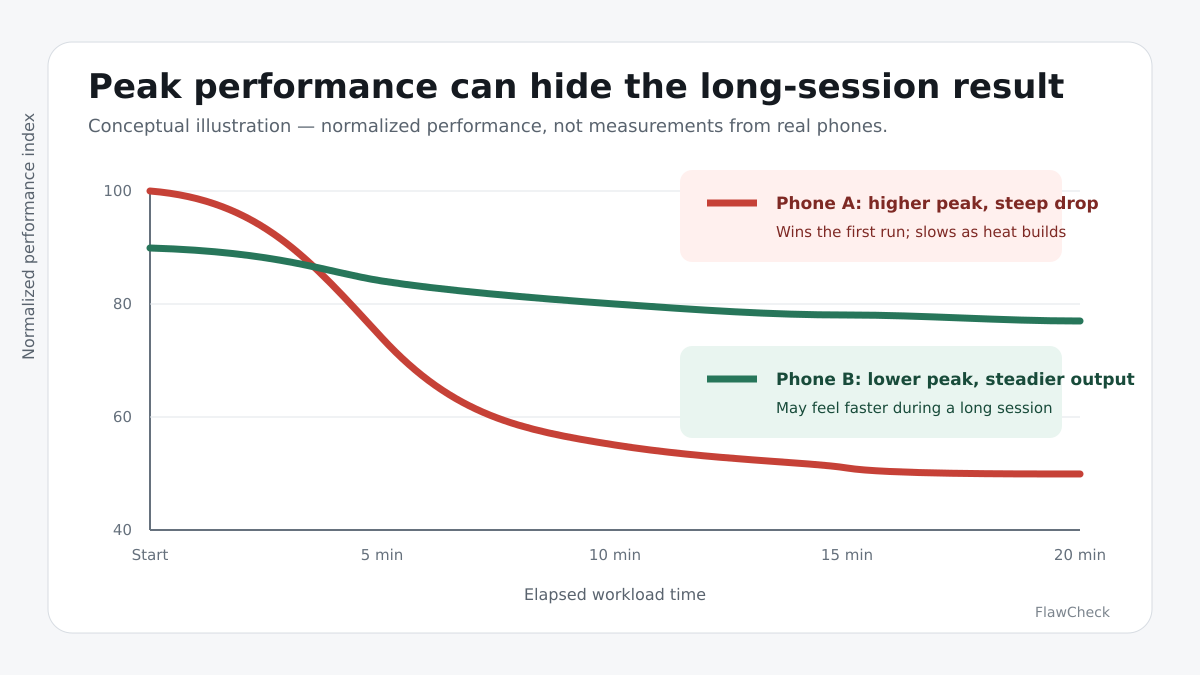
A higher peak clock can improve short tasks such as launching an app or processing a brief burst of work. It may also require more power and produce more heat. If the phone cannot dissipate that heat, the initial advantage can shrink—or disappear—during a long game, video export or AI task.
The useful question is therefore not simply “Which chip has more GHz?” It is “How much work does this phone complete, and how well does it maintain that performance?”
Performance cores, efficiency cores and architecture
Smartphone CPUs use different core types because maximum performance is wasteful for light work. Performance cores handle latency-sensitive or demanding tasks. Efficiency cores handle lighter work and background activity while using less power. Some designs add a prime core tuned for the highest short-term performance.
The operating system’s scheduler assigns work among those cores. A good design can wake powerful cores when needed and return lighter work to efficient cores. Poor scheduling, aggressive background processes or immature software can reduce the benefit.
Architecture matters because a newer or wider core may accomplish more work per clock than an older design. Cache and the memory subsystem also determine how often a core must wait for data. This is why a custom core and a licensed Arm core cannot be ranked reliably by GHz alone.
Buyers do not need to study every microarchitectural detail. The practical lesson is simpler: use architecture and core configuration to understand the design, then use comparable benchmarks to measure the result.
Process node: does 3nm automatically beat 4nm?
A process node such as 3nm or 4nm identifies a generation of semiconductor manufacturing technology. A newer node can give chip designers opportunities to place more transistors in a given area or improve performance and efficiency. The important word is can.
Modern node names are not a universal physical measurement that can be compared as if every foundry used the same ruler. The finished SoC also depends on its architecture, transistor choices, voltage, clocks, physical layout and performance target. The phone then adds another layer of variables, including cooling, battery management and software.
As a result, a 3nm label does not guarantee that every 3nm phone will run cooler or last longer than every 4nm phone. A more aggressive chip can spend its efficiency gain on higher peak performance. A poorly cooled device can still throttle. A large display, weak modem conditions or heavy background software can dominate battery use.
A newer node improves the chip designer’s options, but it does not guarantee better battery life, lower temperatures or faster sustained performance in every phone. Treat the node as context—not a performance score.
GPU specs: what the numbers leave out about gaming
The GPU renders game graphics, supports visual effects and handles many parallel workloads. It can also contribute to image, video and compute tasks. A faster GPU raises the potential performance ceiling, but the model name or a peak graphics score does not guarantee smooth gaming.
Mobile gaming depends on driver quality, graphics API support, game-specific optimization, screen resolution, frame-rate target, power limits and cooling. A phone rendering at a higher resolution gives its GPU more work. A gaming mode may raise performance while increasing battery drain and surface temperature. A thin phone can use the same chip as a gaming phone but sustain less power.
Consider two hypothetical devices. Phone A reaches 120 frames per second for several minutes before heat forces a large reduction. Phone B peaks at 90 fps but maintains it with more consistent frame times. Phone A wins the opening screenshot; Phone B may feel better through a long session.
For gaming, look beyond the maximum frame rate. A 120Hz phone screen does not guarantee 120fps or even frame delivery; use device-level measurements alongside the chip specification. Check:
- Average frame rate over an extended test.
- Frame-time consistency and, where available, 1% lows.
- Performance after 15 to 30 minutes.
- Surface temperature and hot spots.
- Battery drain during the same workload.
- Stress-test stability across repeated loops.
- Results from the games you actually play.
NPU and AI TOPS: useful metric or marketing shortcut?
An NPU—or similarly named AI engine—is specialized hardware for supported machine-learning operations. It can accelerate tasks such as speech recognition, image segmentation, translation, camera enhancement and some generative-AI features while using less energy than running an appropriate workload on the CPU or GPU.
TOPS means trillions of operations per second, but it is difficult to use as a universal buying metric. Published figures may involve different numerical precisions, architectures and measurement methods. TOPS does not tell you the available memory bandwidth, power consumption, model quality or whether a developer can use the hardware effectively.
Most importantly, a high TOPS figure does not prove that a phone offers better AI features. Software must support the accelerator. Some advertised features still rely partly or entirely on cloud processing. Others may be restricted by language, region, app or subscription.
Instead of asking only how many TOPS a chip delivers, ask:
- Which features actually run on the device?
- Do they work offline?
- How long does processing take?
- What happens to battery life and temperature?
- Which languages, regions and apps are supported?
- How long will the manufacturer maintain the feature?
High AI throughput is unused potential if the phone’s software cannot access it—or if the feature you want still depends on the cloud.
ISP specs: why the same processor can produce different photos
The image signal processor helps turn raw sensor data into photos and video. Its pipeline can contribute to demosaicing, autofocus, exposure, noise reduction, HDR combination and video processing. A capable ISP can support advanced camera features, but it does not take the photograph alone.
Image quality still depends on the sensor, lens, stabilization, exposure strategy and computational-photography software. Manufacturers tune color, sharpening, noise reduction, HDR and skin rendering differently. They can also select different sensors and lenses for phones using the same SoC.
Thermal design matters here too. A processor may technically support a demanding video format, but the phone might limit recording time or reduce performance as heat builds. Storage speed and capacity can create additional restrictions.
A specification such as “supports cameras up to 200MP” identifies a platform limit under defined conditions. It does not prove that a 200MP phone produces better pictures. Judge the finished camera using full-resolution samples, motion, low light, HDR, skin tones, video stability and recording-duration tests—not the ISP ceiling alone.
Modem specifications versus real network performance
An integrated or companion modem determines which cellular technologies the platform can support. Its specifications may include 4G and 5G standards, carrier aggregation, supported spectrum and theoretical peak speeds.
Real network performance depends on much more. The phone must enable the bands used in your country, and its antenna design must work well in the finished chassis. Carrier deployment, signal strength, congestion, firmware and even how you hold the device can affect results. Maintaining a weak connection can also increase power use.
A modem capable of multi-gigabit 5G cannot create that speed when the phone lacks the necessary bands, antenna design or carrier support. Check the exact regional model, supported bands and independent reception testing rather than treating the modem’s maximum download figure as a promise.
Benchmarks: what AnTuTu, Geekbench and 3DMark reveal
Benchmarks are useful when the test matches the question. They become misleading when a single score is treated as a complete review.
Geekbench reports CPU-oriented single-core and multi-core results. Single-core testing can help compare short, lightly threaded work; multi-core testing measures workloads that can use several cores. Compare results from the same Geekbench version. Neither score directly proves gaming performance, battery life or camera quality.
AnTuTu combines several parts of system performance into a broad score. That can help compare overall configurations, but the total is influenced by CPU, GPU, memory, storage and other subtests. Two phones with similar totals can have different strengths. Scores from different AnTuTu versions should not be mixed.
3DMark focuses more directly on graphics workloads. Repeated-loop stress tests are particularly useful because they show whether performance falls as the device heats up. Even then, a synthetic GPU test cannot guarantee optimization in a particular game.
| Test | Best used for | Does not prove |
|---|---|---|
| Geekbench single-core | Short CPU responsiveness | Gaming or battery life |
| Geekbench multi-core | Parallel CPU workloads | Sustained performance by itself |
| AnTuTu | Broad system comparison | Performance in every app |
| 3DMark | GPU performance | Game-specific optimization |
| Stress test | Stability and throttling | Everyday efficiency by itself |
| Real game test | Behavior in that game | Performance in every other game |
One run is not enough for a close comparison. Device temperature, battery level, background activity, performance mode, software version and ambient temperature can all move the result. Compare the same benchmark version under similar conditions, use multiple runs and verify synthetic scores with real applications or games. Our guide to reading phone benchmark scores explains the version, platform and workload checks behind that comparison.
Peak performance, sustained performance and thermal throttling
Peak performance is the highest speed a phone reaches during a short test. It matters for brief tasks: opening an app, loading a webpage or completing a quick edit. It is also easy to market because it produces a large number.
Sustained performance is what remains after the workload continues and the device reaches its thermal limits. It matters more for long gaming sessions, extended video recording, exports and repeated on-device AI processing.
Thermal throttling occurs when the system reduces clocks or power to control temperature. Throttling is not automatically a defect; a passively cooled phone must protect its battery, components and user. The questions are how soon it begins, how far performance falls and whether the change disrupts the workload.
A useful stress test therefore shows both the opening result and the later loops. Stability can be expressed as the retained performance relative to the peak, but the percentage still needs context. A phone maintaining a modest peak can show excellent stability while remaining slower than a more powerful phone after throttling.
The practical rule: The phone with the highest first-run score may not be the fastest phone after 20 minutes.
Why two phones using the same chip can perform differently
For a Huawei-specific example, the Kirin generation and variant guide separates the China Mate 80 Pro RAM/chip configurations from global models and conditional device measurements.
The Dimensity generation and variant map separates 9400e, 9500s and 9600M from similarly numbered flagships. Confirm architecture and the exact handset before transferring specifications or review results.
The Exynos generation and Galaxy variant map separates 2400e from 2400 and identifies model-specific evidence. It shows why sharing a chip name does not authorize copying a Flip7 result to an S26 FE.
The Snapdragon flagship chip and phone map gives concrete generation examples and separates clock/core variants. A shared family name does not authorize transferring a phone’s measured results.
The SoC defines common hardware, but each phone gives that hardware a different operating environment.
Cooling is the most obvious difference. Vapor chambers, graphite layers, chassis materials and internal layouts determine how quickly heat moves away from the chip. Manufacturers also set their own surface-temperature and power limits. One phone can stay cooler by reducing performance earlier; another can remain faster while becoming warmer and draining its battery more quickly.
Memory and storage matter as well. RAM bandwidth can affect workloads that move large amounts of data. Storage influences application installation, loading and system responsiveness. If capacity is also part of the decision, our 128GB phone storage guide and free-storage headroom guide explain why advertised capacity and usable working space are different questions. Display resolution changes the number of pixels the GPU must render, so the same SoC may face a heavier graphics workload in one phone.
Software adds further variation. The operating-system scheduler, GPU driver, firmware, game optimization and background services can change performance. Updates may improve stability—or introduce regressions.
| Same chip, different phone | Possible result |
|---|---|
| Larger cooling system | Higher sustained performance |
| Stricter surface-temperature limit | Cooler body but earlier throttling |
| Higher display resolution | Greater GPU workload |
| Faster memory | Better performance in bandwidth-sensitive tasks |
| Better driver optimization | Smoother supported games |
| Heavy background software | Less performance available to the foreground app |
This is also why virtual RAM cannot repair a weak processor, slow physical memory or inadequate cooling. Storage-backed memory may help keep some apps from closing, but it does not create more CPU or GPU performance. The same hardware boundary explains why soldered RAM can become a long-term limitation when the original configuration is too small.
For a concrete Apple example, the A14–A20 Pro chip-to-iPhone map separates the A15 GPU configurations and chip reuse across generations. It also keeps RAM and cooling with the phone rather than assigning them to every device with that chip.
Eight hidden processor flaws buyers should check
- Peak-performance bias: Marketing or reviews highlight the best first run without showing what happens after the phone heats up.
- Sustained-performance throttling: Performance drops enough during a long workload to affect frame rates, exports or recording.
- Same-SoC performance variance: The chip name is identical, but cooling and power tuning produce a different experience.
- Benchmark-to-use-case mismatch: A CPU score is used to claim gaming superiority, or a system score is treated as proof of camera quality.
- Process-node overpromise: A smaller node is presented as automatic evidence of better battery life and lower heat.
- AI TOPS without usable features: The accelerator is powerful on paper, but software, regional support or cloud dependence limits its value.
- Regional chip variation: The same phone family uses different SoCs, modems or supported bands depending on the market.
- Unsupported theoretical capability: The SoC supports a camera mode, display feature or network standard that the phone does not implement.
None of these issues means the processor is necessarily bad. They are warnings that a headline specification needs phone-level evidence. The Galaxy S26 FE review applies this rule to a 3nm Exynos platform whose sustained thermals and retail-unit behavior still require independent verification.
How to compare two smartphone processors properly
- Identify the exact SoC and phone variant. Do not compare only family names. Check the regional version because chips and network support can differ.
- Compare architecture before GHz. Look at the core generation, types and configuration before treating clock speed as an advantage.
- Match the benchmark to your workload. Use CPU tests for CPU questions, graphics tests for gaming and real camera tests for camera decisions.
- Check repeated or sustained tests. Look for stress-test loops, long gaming sessions and performance after heat builds.
- Evaluate the finished phone. Include cooling, RAM, storage, display resolution, software and battery drain.
- Ignore differences too small to affect your use. A narrow score gap can disappear with normal test variation and may be invisible in everyday tasks.
Compare phones, not chips in isolation. The chip defines the ceiling; the finished device determines how often—and how long—you can reach it. Our long-term phone buying guide applies that principle across performance, memory, repair and software support, while the Samsung Galaxy buying guide shows why a processor tier must be judged inside the exact phone and price bracket.
Practical processor-spec checklist
Before buying, check:
- The exact SoC model and regional variant.
- CPU architecture—not only core count.
- Single-core and multi-core results from the same benchmark version.
- A GPU test relevant to the games you play.
- Repeated stress-test stability.
- Surface temperature under load.
- Battery drain during demanding use.
- RAM type and capacity.
- Storage type and performance.
- Display resolution and refresh-rate workload.
- Real camera and video tests.
- Supported network bands.
- Software and driver support.
- Performance after recent updates.
| Your priority | Evidence to prioritize |
|---|---|
| Everyday use | Single-core, app tests and software stability |
| Long gaming sessions | Sustained GPU performance, temperature and battery drain |
| Video recording | Recording duration, dropped frames, heat and storage speed |
| Photography | Real image samples, ISP implementation, sensor and lens quality |
| On-device AI | Supported offline features, processing time and power use |
| Five-year ownership | Efficiency, sustained thermals and software support |
Final verdict: treat the chip as a capability ceiling
Smartphone processor specifications are useful for identifying capabilities and broad performance classes. They are not a substitute for testing the finished phone.
Core count does not reveal core quality. GHz does not measure work per cycle. A smaller process node does not guarantee better battery life. TOPS does not prove useful AI, and a short benchmark does not show sustained performance.
Use the exact SoC model to begin your research. Match each benchmark to the workload it measures, look for repeated tests and check how the phone manages heat, power, memory and software. Small differences on paper can be irrelevant, while an overlooked cooling or support limitation can change the ownership experience.
The processor sets the performance ceiling. Cooling, power limits, memory, software and phone design determine how much of that performance you actually receive.
Frequently asked questions
Does a higher GHz make a smartphone faster?
Not necessarily. Clock speed becomes meaningfully comparable when the CPU architecture and operating conditions are similar. Different architectures can complete different amounts of work per clock cycle, and a phone may not sustain its advertised maximum frequency.
Is an eight-core phone processor better than a six-core processor?
Not automatically. Core type, architecture, cache, software scheduling and thermal limits can matter more than the number of cores.
Is a 3nm phone processor always better than a 4nm processor?
No. A newer node can offer design advantages, but the SoC architecture and its implementation in the finished phone determine performance, heat and battery life.
Which benchmark is best for smartphone processors?
There is no single best benchmark for every question. Geekbench is mainly useful for CPU comparisons, 3DMark targets graphics workloads, and repeated stress tests help reveal throttling. Real applications and games remain necessary for confirmation.
Why do phones with the same processor have different benchmark scores?
Cooling, power limits, RAM, storage, display load, software, drivers, temperature and test conditions can all change the result.
Does a higher AI TOPS number mean better phone AI?
Not necessarily. TOPS does not fully describe software support, model quality, memory bandwidth, power consumption or whether the feature runs locally.
Can processor specifications predict battery life?
Only partly. Battery life also depends on the display, modem conditions, software, battery capacity, workload and the manufacturer’s power tuning.
Sources and further reading
- What is an SoC? Everything you need to know about smartphone chipsets — Android Authority
- Mobile Processors 101 — Qualcomm
- What is an NPU? — AWS
- What Is a Node? — Lam Research
- A Better Way to Measure Progress in Semiconductors — IEEE Spectrum
- The Thermal Efficiency Behind Smartphone Trends — Qualcomm
- AnTuTu V11 Performance Test Breakdown — AnTuTu