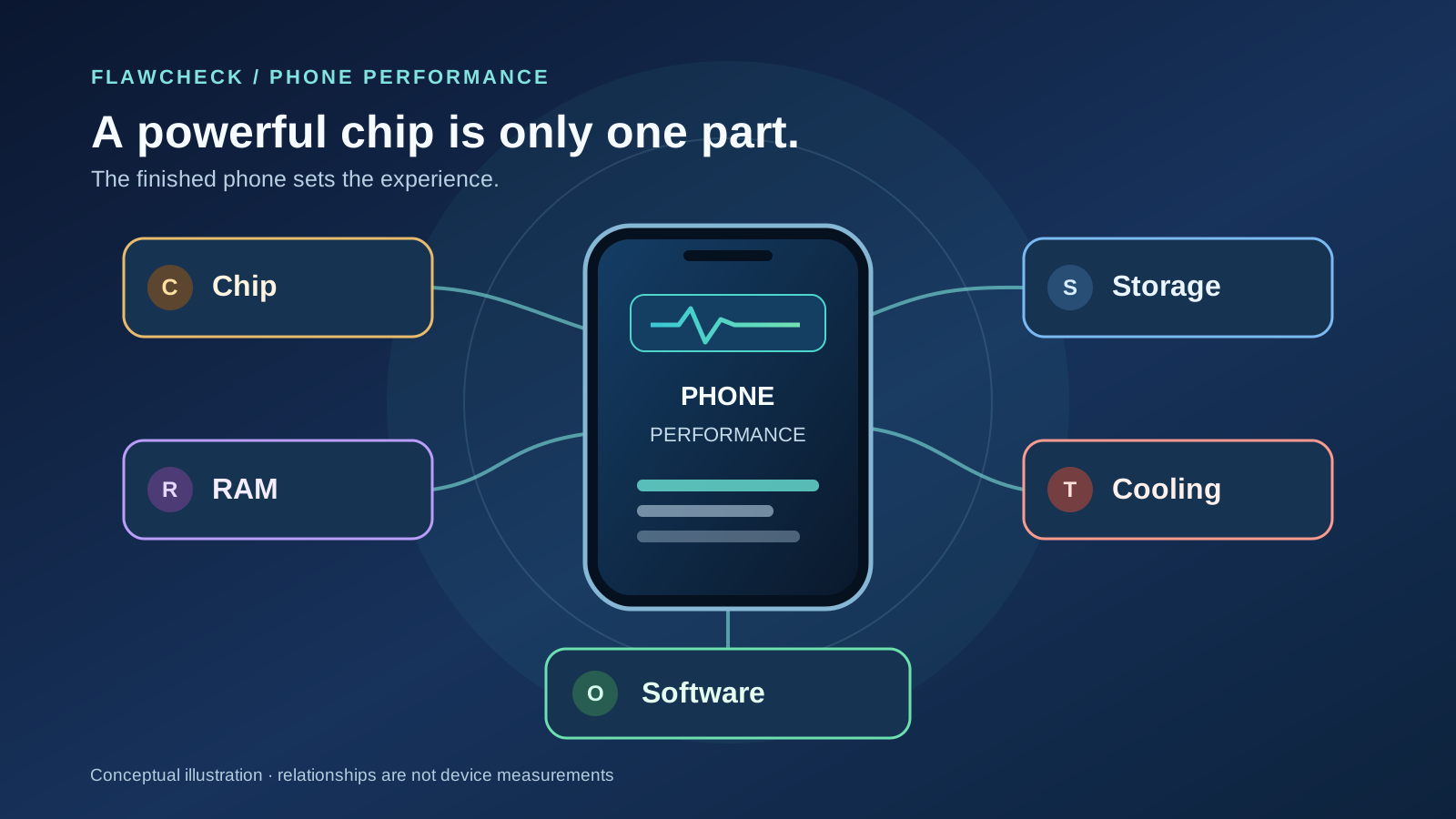
A phone can have a flagship chip and still lose your place when you switch apps, hesitate as a game loads, or turn a smooth match into uneven motion after twenty minutes. The chip matters. The downside is paying for its advertised power without checking whether the rest of the phone—and the task you actually do—can use it.
“Fast” can mean prompt app launch, retained work, steady game frames, or a shorter export. Each depends on a different combination of hardware, software and sometimes a remote service.
Quick answer: Start with your workload. Check repeated launches and responsiveness for everyday use, retained app state for multitasking, and sustained frames or completion time for gaming and creation. Seek evidence from the exact model and configuration. Android guidance distinguishes launch, rendering and sustained operation as separate measures. Android Developers: measuring app performance; AOSP: performance management.
“Fast” Means Different Things on a Phone
Imagine two phones in a store. Phone A opens the camera a little sooner. Phone B returns to a half-written message without rebuilding the app after you take several photos. Which is faster? The answer depends on whether your irritation is waiting for the camera or losing the message. A single “speed test” cannot settle both questions.
App launch has its own starting conditions. On Android, a cold start begins when the app process is absent and the system must load and initialize it. A warm start reuses a running process but does some interface work. A hot start brings an already prepared activity forward. They do not perform the same amount of work, so a comparison that repeatedly opens an app without stating its starting state can flatter one phone or hide a weak cold launch. These are developer categories, not guaranteed timings for every retail phone. Android Developers: measuring app performance.
Switching back to an app asks whether its useful state survived. Scrolling asks whether each frame arrives on time. Games add CPU, GPU and sustained heat demands; exporting video involves the app and media hardware; opening a feed adds network and server work.
Spec trap: A headline benchmark score compresses those experiences into a number from a particular test. What can go wrong: the phone that wins a brief CPU run might still reload apps more often or deliver less even game frames. Buyer check: name the action you care about, then seek a review that repeats that action under stated conditions. Our phone benchmark interpretation guide shows how to check versions, test modes and absolute sustained output. Do not use a gaming score as proof of app retention or a fast-feeling scroll as proof of export speed.
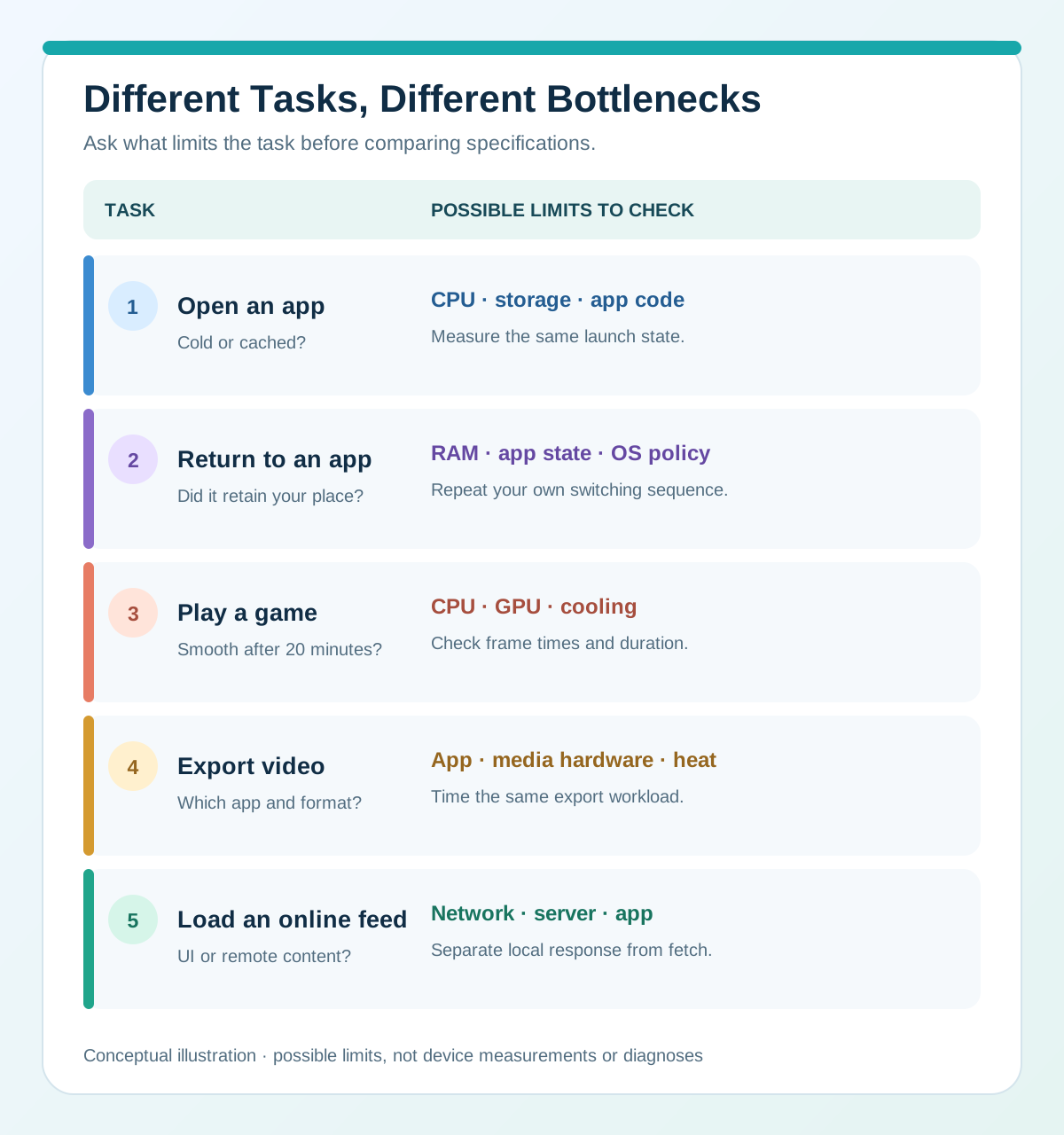
Different Tasks, Different Bottlenecks. Conceptual illustration, not a diagnosis or device measurement; scroll sideways on a narrow screen.
What a Powerful Chip Actually Improves
For Huawei owners, the Kirin upgrade decision guide turns those distinctions into keep, diagnose or upgrade choices without promising benefits from a higher chip number.
For owners considering a MediaTek upgrade, the Dimensity CPU and responsiveness guide distinguishes architecture changes from unmeasured app-level gains. Diagnose storage, battery and software before buying additional CPU headroom.
For Galaxy upgrade context, the Exynos CPU and responsiveness evidence separates architectural changes and reported CPU scores from app-opening, retention and export-time gains that have not been measured. Start with your actual limitation before paying for another generation.
For generation context, the Snapdragon CPU evidence separates benchmark throughput from actual completion times and everyday responsiveness. Read it alongside the memory, storage and software constraints here.
The system-on-chip, or SoC, includes a CPU for general work and a GPU for graphics, alongside other specialized blocks. A stronger CPU can help with work that is actually waiting on CPU execution—for example, a demanding app’s initialization or part of a complex edit. A stronger GPU can help a graphics-limited game scene reach its frame target or run higher visual settings. The exact scene matters: Android’s game guidance describes separate CPU-bound and GPU-bound cases and recommends identifying the actual bottleneck before drawing a performance conclusion. Android Developers: CPU and GPU optimization tips.
Consider a game that runs smoothly in a menu but slows in a crowded scene. The bottleneck could be CPU game logic, GPU rendering, memory access, heat or a combination. More GPU power cannot fix a slow main thread; a faster CPU cannot make remote data arrive sooner. Light apps may also show little difference between chips with very different synthetic scores.
Even with the same SoC, power limits, cooling, display resolution and software differ across phones. Core count, GHz and process-node labels are poor shortcuts across designs. Our smartphone processor specification guide explains those numbers and benchmark types in detail. For a concrete choice between Android chip families, see how to compare Snapdragon and MediaTek phones using the finished devices rather than their badges.
⚠ Hidden downside: Buying the highest chip tier as a blanket cure for slow experiences. What can go wrong: you might pay more for peak CPU or GPU headroom while the wait you notice comes from an app restart, local I/O, an uneven frame pipeline or the network. Buyer check: compare the complete phones in an app-launch test, your game at the same settings, or a timed export, as appropriate. Note the software version, performance mode and whether the result is a single run or a repeated workload.
Component → What it helps → What it cannot guarantee
| Component | What it helps | What it cannot guarantee |
|---|---|---|
| ◆ Chip (CPU/GPU) | Completing CPU work and rendering graphics when those are the limits. | App retention, fast network responses, or stable output as heat builds. |
| ◆ RAM | Keeping more active work available during switching, when memory is the limit. | Faster CPU calculations or perfect restoration by every app. |
| ◆ Storage | Local reads and writes during installs, cold loads and file work. | A fixed app-load time from the UFS label or capacity alone. |
| ◆ Cooling | Managing heat during a sustained demanding task. | A specific FPS or benchmark result from a vapor-chamber claim. |
| ◆ Software | Scheduling work, restoring app state and presenting frames. | Overcoming every hardware limit or remote-service delay. |
The table describes possible roles, not measured shares of performance.
For iPhones, our A14 Bionic to A20 Pro task-based comparison separates CPU benchmark improvement from capability changes in graphics, AI and media. Use that chip context alongside the app, memory, storage and sustained-device evidence discussed here.
Why More RAM Doesn’t Speed Up Everything
RAM gives active processes and data room to stay available. It does not turn a CPU into a faster CPU or increase the GPU’s rendering capability. The benefit is most visible when memory pressure would otherwise force an app to leave memory and do more work on return. Android keeps cached processes for efficient switching but may remove them when resources are needed. How an app saves and restores its state also affects what you see after it returns. Android Developers: processes and app lifecycle; Android Developers: measuring app performance.
Suppose you leave a map route, take several photos, play a large game, and return to the map. If the map starts from its opening screen, available RAM is one possible factor. The system’s background policy, the app’s state handling or an app-specific failure may also explain it. If it opens immediately to the same route, that is evidence about this switching sequence, not proof that every app will stay open all day. Our Android app reload guide separates those causes with repeatable checks.
For buying, repeat a sequence like yours: open a browser and document, use the camera or game, then return. Switching between two small apps may not expose a RAM difference. Compare variants of the same phone under similar conditions; across models, chip, storage and firmware also change. Our 6GB versus 8GB versus 12GB guide covers the capacity decision.
“Virtual RAM” or memory expansion printed on a box is not identical to adding physical DRAM. It may help some memory-pressure situations depending on implementation and workload, but it does not supply extra CPU or GPU throughput. See the Virtual RAM trade-off guide before counting an advertised expansion number as physical memory.
Spec trap: Assuming more gigabytes guarantee both faster processing and perfect app retention. What can go wrong: a higher-RAM phone may feel no quicker in a single light app, while one poorly behaved app may still lose a draft. Buyer check: observe repeated app switching and return-to-state behavior, ideally in the exact RAM variant you would buy; also check the app and phone software involved.
Storage Can Become the Waiting Point
Internal storage keeps apps, media and files after a restart. It becomes relevant when a task actually needs to read or write data: installing a large app, unpacking an update, loading assets on a cold start, saving a large recording, or copying files. RAM and CPU then participate in the same operation. Faster storage cannot erase the time an app spends initializing code, checking a service or processing data after it has been read.
Two “128GB” phones can therefore behave differently: capacity does not state I/O speed. UFS and eMMC describe interfaces, but UFS does not promise a fixed app-launch advantage. Controller, flash, firmware, caching and access pattern matter. A vendor’s random-read figure for a component is not a controlled phone-to-phone launch result. Micron: UFS 4.0 product discussion; FlawCheck: eMMC versus UFS.
Picture a game with a long loading screen. Local storage could be part of it, but decompression, shader preparation, network authentication or the game’s own design may dominate. If the game instead starts quickly but drops frames during play, a storage upgrade is not the first explanation to assume. Ask whether the delay occurs on a cold load, after switching back to a still-running game, or only while content downloads. Those observations narrow what evidence to seek in a review.
Available capacity is another issue. A phone filled close to its limit can make updates and large downloads harder to complete, and some devices may show other symptoms. That does not justify a universal claim that all phones slow down at the same remaining percentage. Our free-storage guide treats the buffer as practical planning advice rather than a guaranteed speed threshold.
Spec trap: Treating capacity or the interface name as a measured launch time. What can go wrong: you may pay for a premium storage label while an app, CPU or network stage still sets the wait. Buyer check: verify the exact market and capacity variant, then look for task-level launch, install and file-transfer results that describe their test conditions.
Peak Speed Isn’t Sustained Speed
A short benchmark asks how quickly a phone can work for that short interval. A long game, video export, navigation session or camera workload asks how much performance it can keep as power use and heat build. Android’s performance guidance recognizes that long-running tasks can change substantially as thermal limits are reached; its sustained-performance features aim for consistent behavior over time rather than an impressive opening burst. AOSP: performance management; Android Developers: optimize power efficiency.
Imagine a racing game that opens at a steady frame rate and begins to stutter after several races. Heat-related power control is a possibility, but the scene may also have changed, the battery mode may have switched, or background work may have started. A single initial FPS figure cannot distinguish those cases. Thermal throttling is normal device protection; what matters to a buyer is whether a drop arrives during their workload, how large or uneven it is, and whether the phone recovers. Our thermal throttling guide covers the mechanism and how to interpret a sustained test.
The same silicon may sit in phones with different heat spreaders and power policies. Charging, ambient temperature, display brightness and cellular use change the thermal situation too. A listed vapor chamber or larger body does not guarantee an outcome; a relevant long-running test does more to establish it.
Spec trap: Choosing by a peak CPU score or one cool-room game run. What can go wrong: a phone can be excellent for quick actions yet inconsistent in a long session. Buyer check: look for repeated runs or a continuous game/export test reporting duration, settings, ambient conditions, battery/charging state and performance over time. Compare average output with low points or frame-time variation, not only the first and highest figure. A stress test is informative, but it is not automatically a substitute for your specific game or editing app.
Software and Display Shape How Fast a Phone Feels
Hardware does not schedule itself. The operating system and app decide which work happens first, how it runs in the background and when a frame is ready to show. A poorly optimized app can hesitate on an otherwise capable phone; an update can alter behavior without changing the chip. Android’s performance guidance recommends measuring launch and rendering separately, which is useful when “lag” describes several different observations. Android Developers: measuring app performance.
A 120Hz display can present images more often when content supplies them. It does not make the CPU export twice as fast or repair uneven game frames. Android documents how short and long frame intervals cause stutter; app support, power saving and settings can also change refresh behavior. Android Developers: Frame Pacing library; AOSP: multiple refresh rate.
Take two phones that finish opening a webpage at roughly the same moment. One may feel more responsive while scrolling because its display shows motion more frequently and its app delivers frames consistently. That is a real part of experience, but it is a different claim from “loads pages faster.” Conversely, a high-refresh panel can expose uneven animation if the app misses frames. Before paying for 120Hz as a cure for slowness, check motion in the apps you use, along with the setting and battery mode the review used. For the full comparison, see our 60Hz versus 120Hz phone display guide.
Spec trap: Equating refresh rate with all-around device speed or blaming the chip for every stutter. What can go wrong: you might solve the wrong problem. Buyer check: separate elapsed task time from perceived motion smoothness; examine frame pacing and app behavior where available, and test the same display mode on each phone.
Sometimes the Wait Isn’t Caused by Your Phone
You tap a product page and a loading spinner appears. The phone may be drawing the interface promptly while the app waits for images, a search result or a server reply. Or it may be doing local processing after the response arrives. Android’s network guidance treats user-initiated requests and their response time as part of the app experience, so a spinner by itself does not identify a weak chip. Android Developers: troubleshoot network issues.
For a buying comparison, use locally available actions as well as connected ones. If a camera opens and local menus scroll promptly but a particular feed repeatedly waits, seek evidence about the app and connection before attributing the pause to processor quality. This is a boundary for interpreting “fast,” not a diagnosis from one symptom.
Spec trap: Expecting a faster SoC to fix every online wait. What can go wrong: a costly upgrade may leave the frustrating pause intact. Buyer check: note whether the same delay appears across apps, networks and offline tasks; avoid concluding cause from a single spinner.
If you are deciding whether stronger older hardware is worth the condition and support trade-off, our older flagship versus new mid-range buying guide compares actual purchase offers rather than relying on the chip tier.
What to Check Before Buying
Choose the test that matches your concern. These are decision prompts, not measured rankings. Compare the exact model, configuration, software and settings where possible.
Your priority → Evidence to check → Spec trap to avoid
| Your priority | Evidence to check | Spec trap to avoid |
|---|---|---|
| ◉ Everyday use | Repeated cold and return-to-app launches; ordinary scrolling in core apps. | One peak CPU score representing every app. |
| ◉ Multitasking | A realistic camera, browser, document and game sequence; return to the original screen. | Virtual expansion counted as physical RAM; capacity assumed to save every app state. |
| ◉ Gaming | Same game and settings over a sustained session; frame-time consistency, lows and battery mode. | Opening FPS or GPU name without test conditions. |
| ◉ Photos and video | Camera readiness, processing wait, sustained capture and a timed export in the relevant app. | One chip score predicting every camera or media pipeline. |
| ◉ Installs and files | Exact storage variant; local load, install and transfer behavior under stated conditions. | Capacity or UFS version treated as a guaranteed launch time. |
Read the test conditions behind any comparison: cold or cached apps, software and battery mode, game duration and graphics settings, and network conditions for web tasks. A disclosed method is more useful than a winner from one number.
Prioritize the weakness that would change your purchase. Messaging and browsing may gain little from peak GPU power. Long gaming calls for sustained and frame-time evidence; lost work during switching calls for retention and app-state checks. No component has a fixed share of responsibility across those tasks.
Verdict
A powerful chip raises what a phone can do. Its name cannot promise fast launches, app retention, even scrolling and sustained gaming on the finished phone.
Write down the two or three actions that matter to you, then demand evidence for those actions on the exact phone. Use specifications to shortlist candidates; use repeated, task-matched tests to decide between them. If that evidence is missing, mark the comparison as uncertain instead of declaring a speed winner.