Your phone may post an excellent benchmark score and still lose noticeable performance after several minutes of gaming, video recording, navigation, or other sustained work. The missing number is sustained performance: how much speed remains after heat builds up. For the complete buying picture across short bursts, app retention, storage and sustained work, see what makes a phone fast.
For gaming that starts smooth and becomes uneven later, follow the early-versus-late gameplay checks and record conditions before attributing a hitch to heat.
Quick answer
Phone thermal throttling is the deliberate reduction of processor or graphics performance when a device approaches its thermal limits. The phone may lower CPU or GPU power, reduce frame rates, dim the display, limit camera functions, or slow charging so that it can control heat.
Throttling is a protection mechanism, not automatically a defect. The buying downside is that two phones with similar peak benchmark scores can behave very differently after 10, 20, or 30 minutes. What matters is how soon performance falls, how far it falls, and whether the drop affects the task you actually perform.
What is phone thermal throttling?
A modern phone’s system-on-chip contains components such as a CPU, GPU and image processor. They consume power and produce heat while opening apps, rendering games, processing photos, recording video, running on-device AI or maintaining a fast cellular connection.
Some heat escapes through the phone’s internal frame, display, back panel and surrounding air. Under a light or brief workload, the phone may dissipate heat quickly enough to retain high performance. Under a demanding sustained workload, however, heat can accumulate faster than the compact, usually fanless body can remove it.
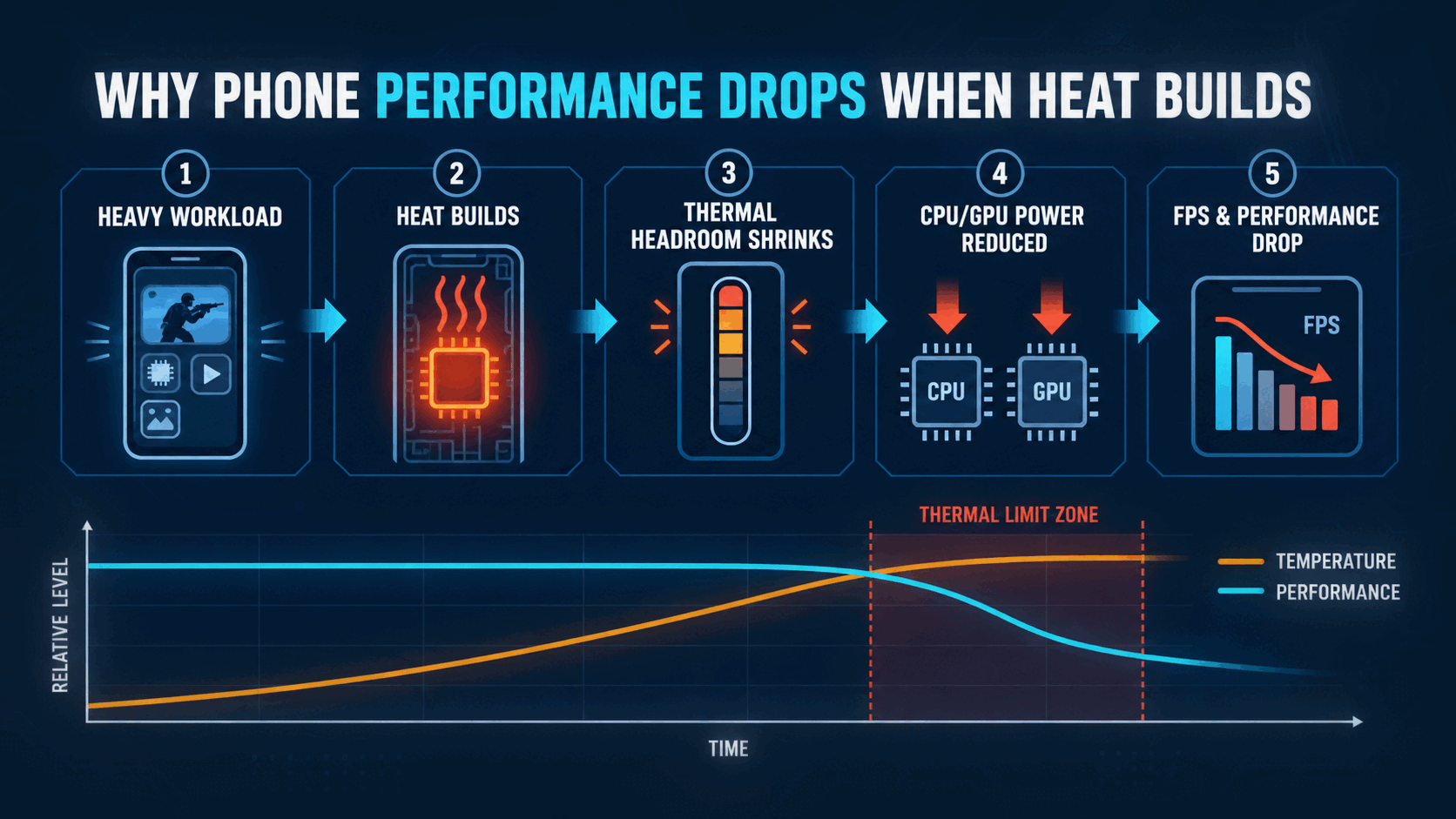
As the remaining thermal headroom shrinks, the operating system and device firmware can reduce power or workload before temperatures become unacceptable. Android exposes multiple thermal states rather than one simple on-or-off condition, ranging from light and moderate states to severe, emergency and shutdown states. The effect can therefore begin gently before it becomes obvious to the user.1
The exact response varies. A phone may:
- Lower CPU or GPU clock speed and power.
- Reduce the game’s target frame rate or rendering resolution.
- Dim the display.
- Limit camera features or interrupt long recording sessions.
- Slow or temporarily pause charging.
- Put cellular radios into a lower-power state.
- Shut down in an extreme thermal condition.
Apple documents several of these temperature-management behaviors for iPhone and iPad, including display dimming, reduced charging, temporarily unavailable camera features and lower-power cellular operation.2
Thermal throttling is not every kind of slowdown
A warm phone that feels slow may be throttling, but similar symptoms can have different causes. For example, Virtual RAM and Samsung RAM Plus address memory pressure and app retention; they do not repair CPU or GPU performance lost to heat. If apps restart when you switch back, use the Android app reload diagnostic to separate memory pressure, battery limits and app behavior.
| What you notice | Possible cause | Is it thermal throttling? |
|---|---|---|
| FPS gradually falls as the phone gets hotter | CPU or GPU thermal limits | Likely, but verify with a sustained test |
| FPS stays locked at exactly 30 or 60 | Game setting, Game Mode or frame-rate cap | Not necessarily |
| Apps repeatedly reload when you switch between them | Limited physical RAM or aggressive background management | Usually not |
| The phone slows down when storage is nearly full | Insufficient storage headroom or background cleanup | Not necessarily |
| Charging slows or pauses while the phone is hot | Charging temperature management | Heat-related, but not proof that the CPU is throttling |
| The display dims during a heavy task | Thermal or power management | It can happen alongside throttling |
| Ping rises while FPS remains stable | Network or server conditions | No |
| The phone becomes unusually hot during light use | A background process, software fault, battery problem or hardware issue | Needs investigation |
When light-use heat comes with unexplained battery loss, check Android background battery activity before assuming a thermal limit is the cause. A hot phone alone cannot identify the app responsible.
Why performance drops as temperature rises
Thermal throttling is better understood as a control loop than a single temperature switch.
- A demanding task raises CPU, GPU, display, camera or radio power use.
- The phone generates heat faster than it can release it.
- Thermal headroom declines as internal sensors approach device-specific limits.
- The system reduces power, frequency or application workload.
- Heat generation falls, but so can FPS, processing speed or feature availability.
If the workload continues, the phone may settle at a lower sustainable level. If conditions improve—because the workload stops, the ambient temperature falls or charging ends—the system may gradually restore performance.
This is why disabling a safety mechanism is not a sensible fix. Removing the limit does not improve the phone’s ability to dissipate heat; it only removes part of the system managing that heat.
Peak performance versus sustained performance
A single benchmark can still be useful. It shows how quickly a phone may complete a short burst such as opening an app, applying a small edit or loading a webpage. But it may finish before enough heat accumulates to expose the phone’s sustained limit. For the broader question of what a benchmark score can and cannot tell you, check its exact workload, version and conditions before comparing phones.
Repeated benchmarks and longer stress tests answer a different question: how much of that initial speed remains over time? The Galaxy S26 FE review shows why FlawCheck leaves a performance verdict provisional when peak specifications exist but controlled sustained testing does not. Android’s sustained-performance guidance exists because performance in long-running, high-load applications can fluctuate as a device reaches thermal limits.3
| Test or metric | What it can reveal | Important limitation |
|---|---|---|
| Single benchmark run | Short-burst or peak performance | It may finish before the phone becomes thermally limited |
| Repeated benchmark loop | How scores change as heat accumulates | A synthetic loop may not represent a real game or camera workload |
| Stability percentage | Performance retained across a specific test | The result depends on the tool, duration, settings and room conditions |
| Lowest loop score | A possible worst period within that test | A momentary low is not the same as typical sustained performance |
| Average real-game FPS | Performance in a relevant workload | An average can hide stutter and uneven frame delivery |
| Frame-time graph | Consistency and visible stutter | It requires controlled, comparable testing |
How to read a stability percentage
The Kirin gaming evidence keeps stress stability separate from absolute FPS and declines a chip ranking when workloads, builds or chassis differ.
The Dimensity sustained-performance evidence separates short GPU scores, stress stability and actual gaming. It also shows why two 1200-family phone results cannot isolate cooling as the sole cause.
The Exynos sustained-load evidence keeps Wild Life separate from Wild Life Extreme and distinguishes stability from game FPS. Its S24 CPU-only temperature observation is also kept apart from unmatched load panels rather than ranking chips by surface heat.
The Snapdragon gaming and stress examples retain interrupted OnePlus 10T runs alongside the completed result. A successful stability percentage alone does not establish repeatable long-session gaming.
If a stress test reports stability as a percentage, it usually compares later or lower performance with the best result obtained during that test. Higher stability generally means less decline within that particular run.
It does not tell you everything:
- A phone can earn high stability by starting at a conservative performance level.
- A faster phone with lower stability may still finish above a slower phone.
- Two results are not comparable if the test versions, durations, battery levels or ambient temperatures differ.
- A synthetic GPU result does not automatically predict camera recording, CPU rendering or cellular performance.
The most useful comparison includes both the initial output and the sustained output—not either number alone.
The A20 Pro sustained-performance evidence provides a device-specific example: Pro and Pro Max results remain separate, and stability percentages are not treated as absolute FPS or averaged across reviewers.
What thermal throttling feels like
The symptoms depend on which component and workload are producing heat.
Gaming
The game may begin at 60, 90 or 120 FPS, then fall after several minutes. Heat can also dim the display, so a session may become harder to see even before average FPS looks unacceptable. Our outdoor screen dimming checklist helps distinguish an actual brightness drop from glare, settings and a temporary sunlight boost. Uneven frame times can feel worse than a stable lower frame rate because animation and input response become inconsistent. Our 60Hz versus 120Hz display guide shows why a higher screen refresh ceiling cannot repair uneven game frames.
Developers can reduce workload before severe throttling occurs. In one Android developer case study, a game that fluctuated between roughly 40 and 56 FPS without adaptive thermal management ran more consistently around 50–60 FPS after dynamically adjusting its workload. That is one implementation example, not a result that should be generalized to every game or device.4
Camera and video
High-resolution or high-frame-rate video stresses the image processor, memory, storage and display simultaneously. In difficult conditions, a phone may restrict camera features, shorten recording time or display a temperature warning. Available behavior varies by model and mode.
Navigation and mobile data
Navigation can combine a bright screen, GPS, cellular data and direct sunlight. A car mount near a windscreen can make the starting thermal conditions worse before the processor becomes heavily loaded.
Charging
Charging produces additional heat. A demanding game or camera task performed while charging gives the phone two simultaneous heat sources. The device may slow charging, reduce performance, or do both depending on its policy. For the choice between a quick top-up and a slower routine, see our fast-charging battery trade-off. Our guide to charging a phone to 80 percent explains why reducing time at a high state of charge cannot compensate for sustained charging heat.
What makes a phone throttle sooner?
No single specification predicts sustained performance. The result comes from the chip, cooling hardware, body design, firmware, workload and environment working together.
High chip power
A powerful chip can complete short tasks quickly, but aggressive peak power also creates more heat. A newer or higher-scoring chip is not automatically worse; efficiency and how the manufacturer configures it matter. The risk appears when the phone cannot sustain the advertised peak within its thermal envelope.
Thin or compact construction
Smaller internal volume and less surface area can make heat management more difficult. A large phone is not guaranteed to cool well, but designers usually have more room for heat spreaders, graphite layers or a vapor chamber.
Cooling-system capacity
Heat spreaders and vapor chambers can move heat away from a concentrated hotspot and distribute it across a larger area. They do not eliminate heat, and their presence alone does not prove superior sustained performance. Size, placement, contact quality, chassis design and firmware all affect the result.
Ambient temperature and direct sunlight
A phone starting in a hot environment has less thermal headroom than the same phone in a cool room. Apple, for example, specifies an ambient operating range of 0–35°C for iPhone and iPad and warns that use in very hot conditions can affect device behavior and battery life.2
That is an operating-environment specification—not a universal CPU throttling threshold.
Charging while using the phone
Fast charging can add substantial heat, especially at lower battery levels when charging power may be higher. The effect on performance is conditional: charging method, battery state, workload, room temperature and the phone’s control policy all matter.
Display, radios and camera running together
Maximum brightness, 5G, weak signal, GPS and continuous camera processing can consume power outside the CPU and GPU. Their combined heat leaves less thermal budget for the application you care about.
A case
A thick insulating case may slow heat transfer in some conditions, but the effect varies by material, coverage, phone construction and workload. Removing the case during a sustained heavy task can be a useful controlled check. It is not proof that every case causes throttling.
Does a hot phone always mean bad cooling?
No. The temperature you feel is the surface temperature, not a direct reading of the processor.
A warm frame or back panel can indicate that the phone is successfully spreading internal heat toward the exterior. Conversely, a cooler-feeling surface does not prove that the chip is cool; heat may remain concentrated internally, or the phone may already have reduced power aggressively.
Surface temperature still matters for comfort and safety, but cooling quality should be judged with several measurements:
- Performance or FPS over time.
- Frame-time consistency.
- Surface temperature measured at consistent locations.
- Power consumption where available.
- Thermal status or headroom where supported.
- Identical workload, display, network and environmental conditions.
Avoid declaring one phone better merely because it feels cooler—or hotter—in an uncontrolled comparison.
How to interpret a phone throttling test
Before trusting a graph or stability score, look for the test conditions.
1. Ambient temperature
A result recorded in an air-conditioned room is not directly comparable with one recorded outdoors or in a warmer room. Even a modest difference changes the phone’s starting thermal headroom.
2. Starting temperature and battery level
A phone tested immediately after charging or another benchmark may already be warm. Battery state can also alter charging behavior and available power.
3. Charging state
Testing while plugged in can add heat or invoke a different performance profile. The reviewer should disclose it.
4. Display settings
Brightness and refresh rate affect power consumption. Manually matching brightness is more useful than simply selecting the same percentage on two phones.
5. Network conditions
Wi-Fi, 5G and weak cellular reception can change total device power. Network-heavy tests require especially careful control.
6. Case and accessories
The test should state whether a case or external cooler was fitted.
7. Test duration and workload
A five-minute loop and a 30-minute loop answer different questions. CPU, GPU, camera, AI and modem workloads also heat different parts of the device.
8. Performance floor as well as percentage retained
Suppose Phone A starts at 100 units and retains 70%, while Phone B starts at 75 and retains 90%. Phone A still ends at 70 units and Phone B at 67.5. Stability alone would make Phone B look better, even though their final performance is similar.
The best review reports peak, average, lowest sustained output, stability, temperature and the complete method.
How to reduce thermal throttling safely
You cannot remove the laws of thermodynamics, but you can reduce overlapping heat sources and lower sustained demand.
| Heat factor | Likely effect | Safer response |
|---|---|---|
| Gaming while charging | Adds charging heat to CPU/GPU load | Charge before playing or disconnect once sufficient |
| Targeting 120 FPS | Raises GPU and display workload | Try a stable 60 FPS target |
| Maximum graphics and resolution | Increases sustained GPU demand | Reduce resolution or the heaviest graphics setting |
| Direct sunlight | Raises the phone’s starting temperature | Move into shade and stop intensive use until it cools |
| Thick case during a long heavy task | May slow heat transfer on some phones | Test briefly without it in a safe environment |
| 5G, GPS and camera together | Combines several power-hungry systems | Disable functions not required for the task |
| Maximum screen brightness | Adds display heat and power use | Reduce brightness when visibility allows |
Additional steps:
- Pause the workload and let the phone cool naturally at room temperature.
- Keep software and games updated when updates specifically address power or thermal behavior.
- Restart the phone if an abnormal background process appears to be generating heat.
- Use a lower, stable graphics preset rather than chasing an unstable peak frame rate.
- For long recording sessions, avoid direct sunlight and test the exact resolution and frame-rate mode before an important event.
Do not place a hot phone in a refrigerator or freezer, press it against ice, or expose it to water. Rapid cooling can cause condensation, and extreme temperature changes create additional risk. Do not root or modify the device merely to defeat its thermal protections.
When throttling may indicate a real problem
Some throttling during a prolonged demanding task is expected. Seek further diagnosis when the phone:
- Becomes unusually hot during messaging, reading or other light use.
- Repeatedly shows temperature warnings in ordinary indoor conditions.
- Shuts down because of heat during routine use.
- Became much hotter immediately after a software or app update and does not settle after background setup finishes.
- Has a swollen battery, lifted screen, unusual smell or damaged enclosure.
- Heats rapidly while idle, even after a restart.
Stop using and charging a device with signs of battery swelling or physical battery damage, and obtain qualified service. That is a battery-safety issue, not a benchmark problem.
Buying verdict: do not buy a benchmark peak
Peak performance still matters for short tasks. Most users do not hold the CPU and GPU at maximum load for 30 minutes, so a fast burst can make everyday interactions feel responsive.
But gamers, creators, frequent navigators and people who record long high-resolution videos should give sustained performance more weight. For a wider five-year decision, Best Phones for Long-Term Ownership places thermal consistency alongside battery service, storage, repair access and software support. Look for reviews that disclose their method and show performance over time, not just the first run.
The key buying questions are:
- How fast is the phone before it becomes hot?
- How long does that level last?
- What performance remains after temperatures stabilize?
- Does the phone maintain smooth frame delivery, or oscillate between fast and slow?
- Were competing phones tested under the same conditions?
A phone that begins slightly slower but remains consistent may deliver a better long-session experience than one that wins the first benchmark and then drops sharply.
Frequently asked questions
Is thermal throttling bad for a phone?
Thermal throttling itself is generally a protective response. It reduces heat-generating activity before conditions become more severe. Heavy throttling can still expose a design or configuration trade-off if it materially harms the tasks the phone is marketed to perform.
Can thermal throttling damage a phone?
Throttling is intended to reduce thermal stress, not cause damage. Excessive heat, a damaged battery or repeatedly operating outside the manufacturer’s recommended conditions is the concern.
Can you disable thermal throttling?
Users should not disable it. Some modified systems claim to change thermal limits, but doing so can increase surface temperature, battery stress, instability and shutdown risk. Reduce workload or heat sources instead.
Does a phone case make thermal throttling worse?
It can in some combinations of case material, phone design and sustained workload, but not always. Compare the same workload, room conditions and starting temperature with and without the case before drawing a conclusion.
Does fast charging reduce gaming performance?
It can contribute because charging adds heat while the game loads the CPU and GPU. The actual effect depends on charging power, battery level, bypass-charging support, room temperature and device policy. For the cleanest test, compare gaming while unplugged at similar battery levels.
How long does a phone take to cool down?
There is no universal time. It depends on how hot the internal components became, the case, ambient temperature, airflow and whether the workload or charging continues. Stop the heavy task and wait until the device returns to a comfortable operating temperature naturally.
Is vapor-chamber cooling always better?
No. A well-designed vapor chamber can spread heat effectively, but its name alone says little about size, placement, chassis contact or firmware tuning. Sustained performance measured under controlled conditions is better evidence than a cooling-system label.
Bottom line
Thermal throttling explains why the fastest number on a specification sheet may not be the speed you retain during a long session. It is normal for phones to manage heat, but the size, timing and real-world impact of the performance drop remain important product flaws or trade-offs to investigate.
Judge a phone by both its peak capability and its sustained floor. The first tells you how fast it can be; the second tells you how much of that speed you can actually keep.
Sources
Footnotes
-
Android Developers, Thermal API and thermal status definitions. ↩
-
Apple Support, If your iPhone or iPad gets too hot or too cold. ↩ ↩2
-
Android Open Source Project, Performance management and sustained performance mode. ↩
-
Android Developers, Netmarble Games: Optimizing performance with ADPF. ↩